

Mobile phone wholesaler software for parts and electronics suppliers
Software for parts distributors and wholesalers. SlickCell is mobile phone wholesaler software for businesses that supply repair shops and electronics retailers. The shops you supply raise the order in their own SlickCell account, and it arrives in yours as an order: not an email to re-key, not a PDF someone reconciles later.
One morning, start to finish
Twenty past eight. An order lands from a shop you supply, ten screens and six charging flexes, carrying their own purchase order number. You have the screens. You have four of the flexes. So the quote goes back saying four, not six, and the shortfall is a number on the order rather than a phone call at five o'clock.
They approve it before ten, which holds the stock against that order instead of leaving it on the shelf to be sold twice. It goes out on the afternoon courier, and confirming the dispatch is the moment it leaves your inventory.
One screen arrives marked. They book it in as damaged, you authorise the return, and the credit is on their statement before the week is out.
How an order moves between a repair shop and a wholesaler
Eight steps, and the only two that belong to the shop are the two that should: approving the quote, and saying what turned up.
- 01It arrivesTheir purchase order lands as your incoming order, their PO number on it.
- 02Match the linesTo your own stock, or offer an alternative, a special order, or nothing.
- 03QuoteConfirm, re-price, or supply four where six were asked for.
- 04They approveAll of it, or some lines and not others: their decision, recorded.
- 05ReserveApproved stock is held against that order rather than sold twice.
- 06DispatchConfirming the dispatch is the moment stock leaves your inventory.
- 07They book inLine by line: accepted, damaged, missing or wrong item.
- 08SettleThey submit a payment; you verify it; the statement moves.
Nothing in that sequence is transcribed. What they ordered and what you read are one record, and what you sent and what they booked in are checked against it rather than against anybody's memory.
The screen that decides what a buyer sees
Not a claim about the supplier side. One of its screens, photographed, with the rule printed on it.
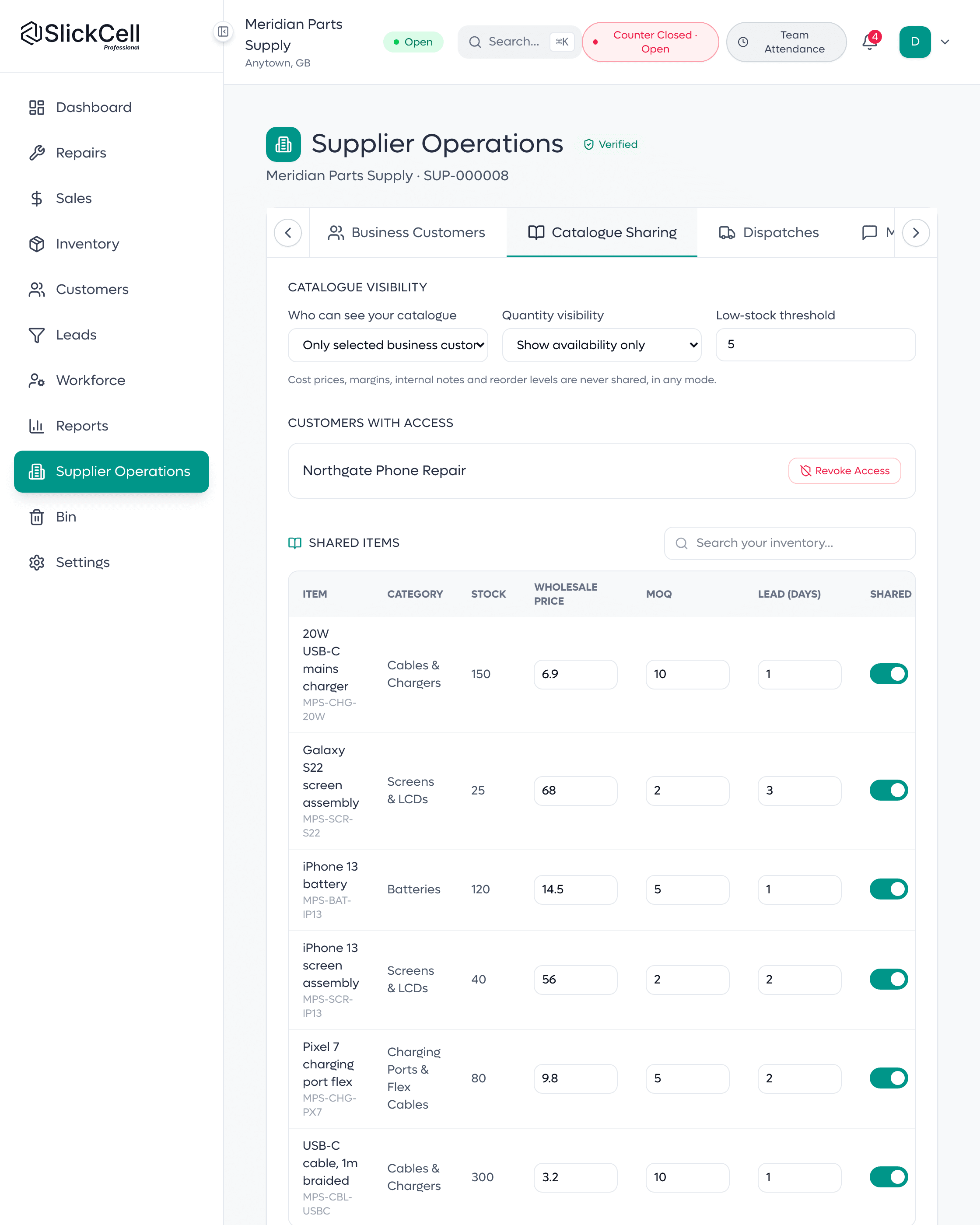
What a buyer is shown
The sharing panel that decides it: exact stock, availability only, or nothing at all. Below it, the line that says cost prices, margins, internal notes and reorder levels are never shared, in any mode. Beside it, the customers with access and the wholesale price on each shared item.
Fewer phone calls, and an argument you can settle
What a wholesaler notices in the first month of running an order this way.
- One order, not two records
- Their purchase order and your sales order are the same document, so nothing is keyed twice and nothing drifts.
- A short line is a number
- Supplying four of six is quoted on the order rather than explained on the phone, and it stays visible afterwards.
- Stock that leaves once
- Approved lines are reserved, and inventory only moves when you confirm the dispatch.
- A shortage with a paper trail
- What arrived damaged or missing is booked in against what you sent, so the credit is agreed from a record.
- A balance that means one thing
- A payment is a claim until it is verified, and a claim never quietly reduces what is owed.
Wholesale point of sale software, and the supplier side on top
Your trade counter runs on the same till, stock and invoices as the orders from connected shops.
Incoming orders
A shop's purchase order arrives as your order, their reference on it.
A shared catalogue
Wholesale price, minimum order quantity and lead time, per item.
Control what is seen
Exact stock, availability only, or nothing. Cost and margin never.
Versioned quotes
Re-price or offer an alternative; every version keeps its reason.
Reserve on approval
Approved lines are held against that order rather than sold twice.
Dispatch
Delivery, courier, collection or third party: stock moves on confirm.
Receipt, line by line
They book in what arrived: accepted, damaged, missing or wrong.
Discrepancies that end
Replace, authorise a return or issue credit; the shop confirms it closed.
Payment verification
A payment is a claim until you verify it. Pending moves no balance.
Customer statements
Invoiced, outstanding and overdue per shop, with terms and a limit.
A thread per order
One conversation in one place, with notes only your staff can see.
Business customers
Pause new orders, decline with a reason, or archive once nothing is open.
Every shop you introduce is worth a month of what they pay
Not a share of it, and not a fraction of your own bill. A shop that signs up through your link and pays for Professional earns you £59 against your next invoice.
| The shop pays for | One shop | Three shops | Ten shops |
|---|---|---|---|
| Starter, £39 a month | £39 | £117 | £390 |
| Professional, £59 a month | £59 | £177 | £590 |
| Supplier Pro, £99 a month | £99 | £297 | £990 |
| Enterprise, priced individually | £99 | £297 | £990 |
How you earn one, and how you spend it
The four that matter most. There are 13 in total, and the rest are on the programme page.
- Share your link, or tell us the name
- Your link and its QR code are in the app under Settings → Referrals, and a shop that signs up through either is matched to you automatically. If you would rather tell us who to expect, the form still works and a person still reads it. Both mechanisms earn the same.
- It counts once they are paying
- The fourteen-day trial does not count. A shop earns you their first month's plan price the first time they actually pay for a plan, and nothing before that.
- Fourteen days before it is yours
- A reward is held for fourteen days after the shop's first payment. If that payment is refunded inside those fourteen days you earn nothing, because the shop never really paid. It is a holding period, not a delay in applying it.
- It comes off your next bill
- Credit is added to your SlickCell account and the next invoice takes as much of it as it is worth, carrying the rest to the one after. It covers whatever that invoice covers, additional locations included. It does not expire and it is not paid out in cash.
Wholesale software: what suppliers ask first
Straight answers to what wholesalers ask before they sign up.
No. You choose “supplier” as your business type when you set the account up, and the supplier side is switched on for you. What you should know is that there is no separate distributor product: you get the whole platform (stock, a counter, invoices, customers and reporting) with Supplier Operations on top of it. For most wholesalers that is useful rather than surplus, because a trade counter is still a counter.
Yes. A supplier account is the whole SlickCell platform, with a till for your trade counter, stock, invoices, customers and reports, plus Supplier Operations: incoming orders from connected shops, versioned quotes, stock reserved on approval, dispatch, and statements for each business customer with terms and a credit limit.
For the connected order, yes. The whole point is that their purchase order and your sales order are one record, and that only works when both businesses are on it. Everyone else is still an ordinary customer with ordinary invoices. You are not locked out of trading with them, you just re-key their orders the way you do now.
Yes, when your supplier is connected. Your purchase order lands in the supplier's own account, they confirm or re-quote and dispatch, and you book in what actually arrived without retyping it.
You decide, per catalogue. Quantity can show as an exact figure, as availability only, or not at all. Prices are the wholesale price you set per item, and an item left without one shows as price on application. Cost prices, margins, internal notes and reorder levels are never shared, in any mode.
Two steps, and the second one catches people out. First you apply from your settings, which is where the trading details, categories and delivery terms go. Once that is approved you still have to publish your public profile (a description, at least one supplier type, at least one category and a fulfilment method) and until you do, you are approved but not listed.
Shops already on the platform can add you as their supplier and start ordering straight away, so new trade reaches you with no approval queue. You control everything from there: you can turn new orders off, decline an order with a reason they see, set credit terms and a limit per customer, or archive the relationship once nothing is outstanding.
They book the delivery in line by line (accepted, damaged, missing or the wrong item) and raise a discrepancy against the lines that were not right. You accept it, accept part of it, or reject it with a reason. Then you send a replacement, authorise a return, or issue a credit, and the shop confirms it is settled before it closes.
The order becomes an invoice, and when a shop pays it they submit the payment against it. That submission is a claim until you verify it, and an unverified claim never reduces the balance you are owed. Each business customer has a statement showing what has been invoiced, what has been verified, what is outstanding and what is overdue, against the terms and credit limit you set for them.
Supplier Operations is part of the Supplier Pro plan rather than an extra you bolt on, so one price covers the platform and the supplier side together. The trial runs fourteen days on that plan with every feature available and no card, which is long enough to take a real order from a real customer before you decide.
Yes. One shop is worth something on its own: £39 if they pay for Starter, £59 for Professional, £99 for Supplier Pro. Two or three is a month you largely do not pay for, so the arithmetic starts working at two or three rather than at thirty. What it will not do is pay you, the reward only ever cancels your own bill. The plan prices it follows are on the pricing page.
As many as you like, and there is no ceiling on what you can earn. Credit that is worth more than your next bill is not lost, the invoice takes what it is worth and the rest waits for the one after. Because a shop earns once rather than every month, bringing more is the only way to keep earning, which is exactly the way round we want it.
Both, in the app under Settings → Referrals: your link, a QR code for it, who has arrived through it and what each one is worth. A shop that signs up through the link is matched to you without anybody doing anything. If you would rather tell us a name than share a link, the form still works and a person still reads it.
If they cancel, the reward is still yours, it is earned on their first paid month and it is for bringing them, not for keeping them. What does come back is a REFUND: inside the first fourteen days you earn nothing, because the payment did not stand, and after that we take back the same share that was refunded and no more.
The earning is automatic, the link matches them, their first payment qualifies it, fourteen days pass and the reward is yours. Moving it onto your account is done by a person here, and then your next invoice takes it automatically. If you are close to a bill and want it on that one, say so and we will make sure it is applied first.
No. The reward follows their subscription, not their orders. If a shop you introduced starts buying from another wholesaler as well, or instead, what you earned is still yours. They are still a customer here and you are still the reason. We would rather not be in the business of policing who you trade with.
Take your first order without re-keying it
Fourteen days on Supplier Pro, no card. Long enough to publish a catalogue, connect one shop, and see an order arrive as an order.