

Desktop repair shop software for towers, all-in-ones and mini PCs
A tower, an iMac and a mini PC are three different jobs. SlickCell books each against a desktop-only model list, and keeps the desktops you stock in a category of their own, with processor, memory, graphics and form factor on the record.
A gaming tower that will not boot, and an iMac behind it
SlickCell is desktop repair shop software for UK shops that fix towers, all-in-ones and mini PCs alongside laptops, phones and tablets. Desktop / All-in-One is a device type of its own, with more than 450 desktop models to pick from once it is chosen, and it never suggests a laptop model. iMacs are listed by screen size and year, from the iMac 21.5" (2013) to the iMac 24" (M4, 2024), beside all-in-ones such as the HP EliteOne, the Dell OptiPlex All-in-One and the Surface Studio. Mini PCs from Beelink, Minisforum, Geekom, Intel NUC and Zotac are desktops here, not laptops. So are gaming towers and workstations: Alienware Aurora, Corsair Vengeance, Dell Precision, Fujitsu Celsius, Mac Pro and Mac Studio.
Monday a gaming tower comes in that powers on and shows nothing. It is booked as Desktop / All-in-One, the model is picked from the Alienware list, and its serial number goes on the ticket. After diagnosis the fault is the graphics card. A quote for a replacement goes to the customer, and the ticket waits at Quote Sent until they approve it.
The card is not on the shelf, so the ticket sits in Awaiting Parts while a purchase order goes out. When it arrives it is booked in against that order, fitted, and taken off stock onto the job. Behind it on the bench an all-in-one needs a new power supply, on a ticket of its own.
The modules that made it happen
RepairsInventory & device unitsPurchase orders & receivingInvoicing & paymentsFor computer repair shopsReports & tax
From the bench to collection, on one ticket
The states a desktop job passes through, each one visible on the ticket and in the queue.
- 01Booked inDesktop / All-in-One, the model from the desktop list, and the serial.
- 02DiagnosedWhat failed, written on the ticket.
- 03Quote sentA graphics card or power supply priced before it is ordered.
- 04Awaiting partsA status of its own, tied to the purchase order.
- 05RepairedThe part comes off stock and onto the job.
- 06CollectedAny deposit taken at booking counts against the bill.
A board-level fault you send to a specialist is marked Outsourced and stays on your queue while it is away, so the customer is still yours.
Three screens a desktop job passes through
Real captures from the product: the ticket, the part on order and the stock list.

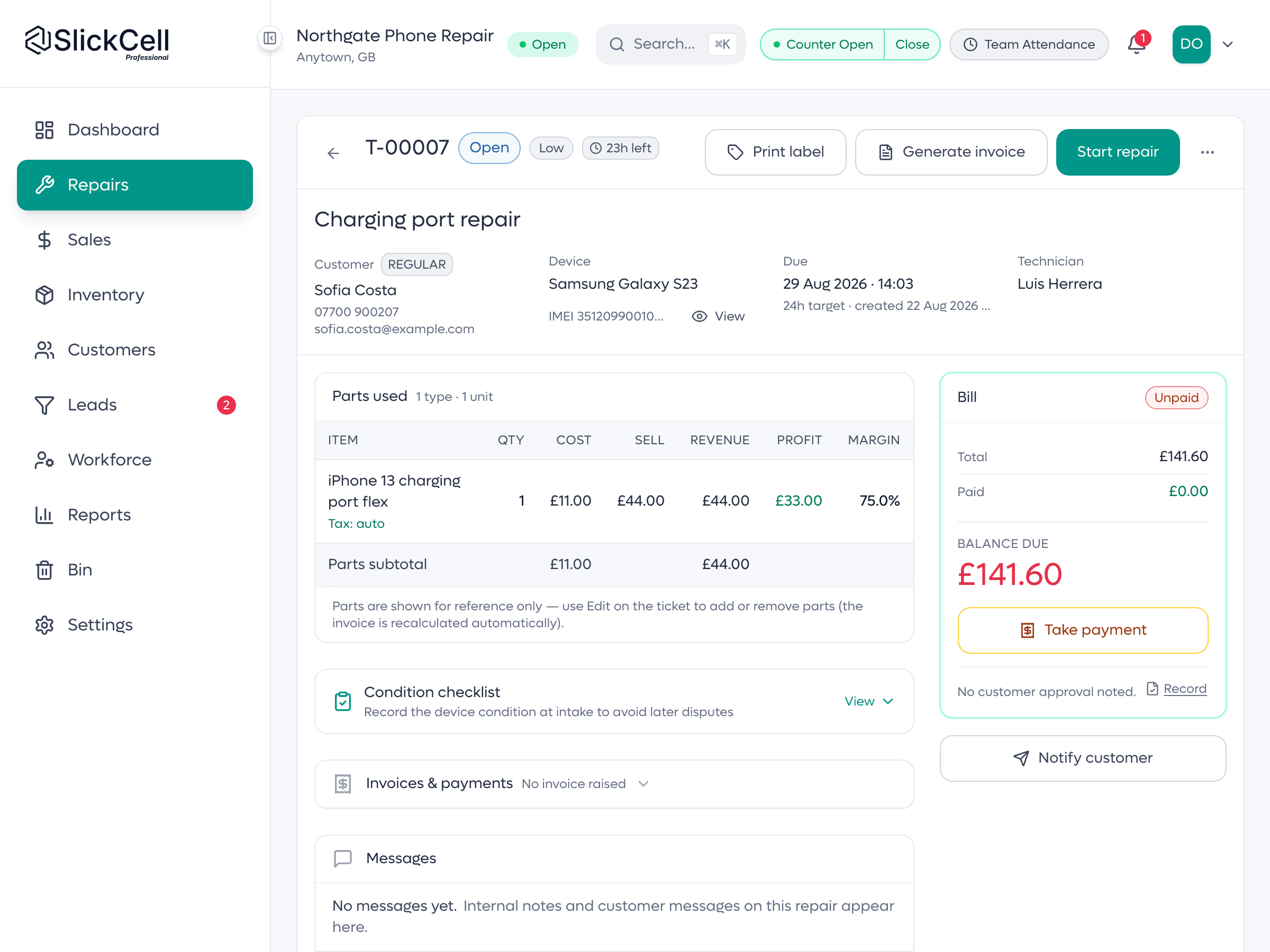
The ticket, the parts and the bill together
One repair ticket: the machine and its reference, the parts used with their cost and margin, the bill with what is paid and what is due, and the button that updates the customer.

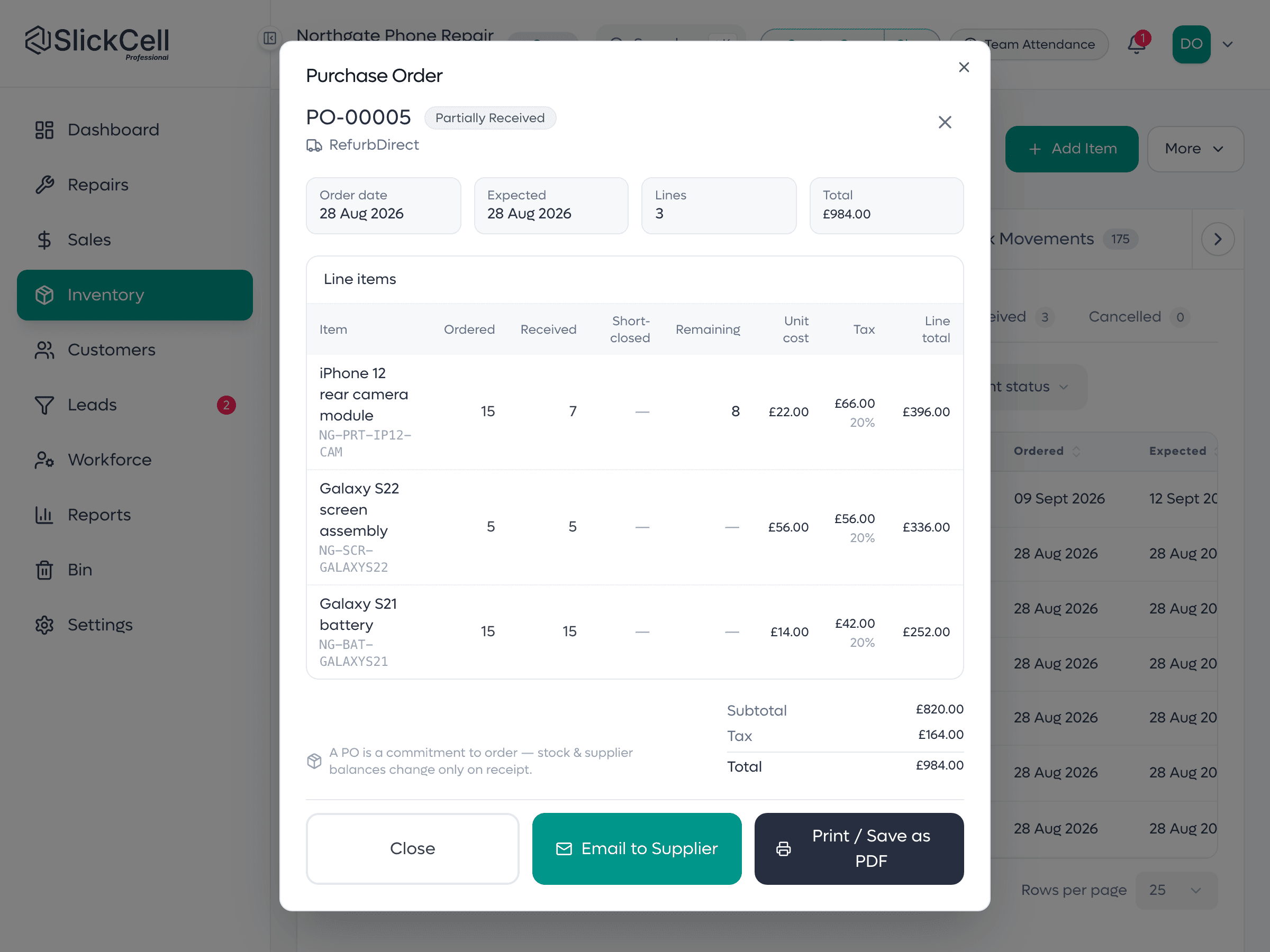
A part on order, then received
The purchase order for the part, with what was ordered against what arrived, and the goods-received note that booked it in.
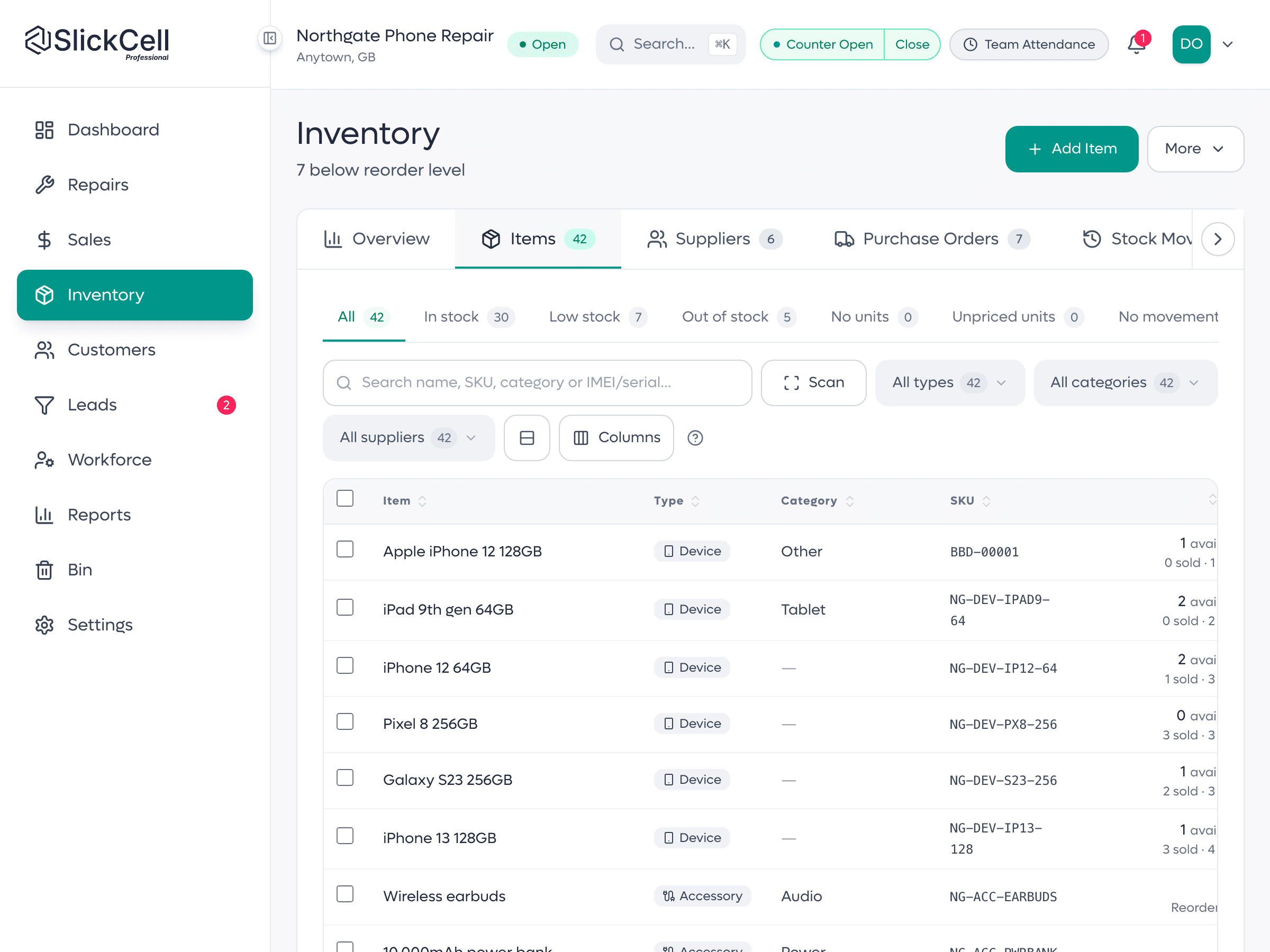
Stock, by category
The stock list with its type and category filters: parts and accessories counted by quantity, machines counted from their own units. A desktop you stock lands in Desktops by default.
Desktops kept apart from laptops, and parts that are tracked
What a desktop shop owner notices after the first month.
- The right model list
- Pick Desktop / All-in-One and the model list holds desktops only, with no laptops to scroll past.
- Mini PCs where you look for them
- A Beelink or an Intel NUC is found under desktops, not laptops.
- Desktops apart in stock
- A desktop you stock defaults to the Desktops category, so the stock list filters it apart from laptops.
- Form factor, not screen size
- A desktop record asks for form factor, all-in-one or tower, where a laptop record asks for screen size.
- Parts on order are visible
- Awaiting Parts is a status with a date and a purchase order behind it, not a note.
Built for towers, all-in-ones and mini PCs
Repairs
Power supplies, graphics cards and machines that will not boot: one ticket per job, with the quote on it.
Awaiting parts
A real status with a date, tied to the order that will clear it.
Towers and workstations
Alienware, Corsair, Dell Precision and Fujitsu Celsius models in the desktop list.
All-in-ones and iMacs
iMacs by screen size and year, beside HP, Dell, Lenovo and MSI all-in-ones.
Mini PCs
Beelink, Minisforum, Geekom, Intel NUC and Zotac, listed as desktops.
The build on record
Processor, memory, storage, graphics and form factor on every desktop you stock or buy in.
Parts by quantity
Power supplies, graphics cards, memory and drives counted; machines tracked one by one.
Purchase orders
Order the part, then book in what arrived against that order.
A till for the counter
Repairs, accessories and refurbished machines on one sale, split across card and cash.
Deposits and balances
Money taken at booking counts against the bill at collection.
Customer updates
Email from the job, and a QR code on every receipt that opens live tracking.
What desktop shop owners ask
The questions shops ask before they switch, answered straight.
Its own. Desktop / All-in-One is a device type with a model list of more than 450 desktops and all-in-ones, so choosing it never offers a laptop model. Its record asks for processor, memory, storage, graphics and form factor, and a desktop you stock goes into the Desktops category rather than Laptops.
Under desktops. Mini PCs from Beelink, Minisforum, Geekom, Intel NUC and Zotac are in the desktop list, and so are all-in-ones: iMacs by screen size and year, the HP EliteOne, the Dell OptiPlex All-in-One and the Surface Studio. A model that is not listed can be typed in and added to your shop's own list.
Yes. The ticket carries a quote that goes to the customer and sits at Quote Sent until they approve it, so the price is agreed before you order anything. The part is then ordered on a purchase order, the job waits in Awaiting Parts, and fitting it takes the part off stock and onto the ticket.
Yes, in the same system. Laptop is a device type of its own, with its own model list and fields, so a shop that fixes both books each machine under its own type. The page for computer repair shops covers laptop and desktop work together.
By text or email from the job, on templates each shop can edit. Every receipt and repair label also carries a QR code that opens a live tracking page, with no app and no login.
Starter is £39 a month, Professional £59 and Supplier Pro £99, all excluding VAT, or ten times the monthly price for a year. Every feature is on every plan; plans differ by team size, locations, discount rules and support. Every plan starts with a fourteen-day free trial with no card.
Yes. Parts, accessories and devices import from CSV with a preview of exactly what will be written before anything is saved. Most shops finish open repairs on the old system and start new work in SlickCell from go-live.
Bring us a desktop job
A tower that needed a graphics card, or an all-in-one that needed a power supply. We will run it end to end on your own workflow.