

Electronics repair shop software, by IMEI or serial
SlickCell is electronics repair shop software for the morning a phone, a laptop, a games console and a smartwatch all come in: each booked in by its type and its IMEI or serial number, and each run through the same ticket, invoices and cash drawer.
Electronics repair software for every device type
SlickCell is built for shops that fix more than phones. Phones, tablets, laptops, desktops and all-in-ones, games consoles, smartwatches, earbuds and headphones are device types in their own right, each with its own brand list and the spec fields that matter for it. Every device you stock carries its own IMEI or serial number, searchable at the till and in stock. The job runs on one repair ticket: the fault described at the counter, a quote the customer approves, parts taken from stock, and handover with the balance settled against any deposit, into the same cash drawer as your accessory and refurbished sales. If you were looking for electronics repair shop management software, this is the whole of it in one web app, hosted in London, from £39 a month excluding VAT.
Nine o'clock: a phone with a cracked screen, booked in by IMEI or serial, the damage marked on the intake checklist and the new screen taken off stock onto the ticket. Half nine: a laptop that will not start, booked in by serial, its hinge, keyboard and trackpad checked at the counter, and a quote sent before any part is ordered.
Ten o'clock: a games console with its controllers ticked off as received. The part it needs is on a purchase order, so the ticket sits in Awaiting Parts with the date it went in. Eleven: a smartwatch booked in by serial, its strap and health sensors checked at the counter. Four devices, four types, one queue.
Track repairs from booking to handover
The same states for a phone, a laptop or a console, each one visible on the ticket and in the queue.
- 01Booked inType, make, model, IMEI or serial, and the fault.
- 02DiagnosedFindings on the ticket, in the technician's words.
- 03Quote sentPriced before the work, with the customer's agreement recorded.
- 04Awaiting partsA status of its own, with the date the job entered it.
- 05RepairedParts used come off stock and onto the job.
- 06CollectedBalance settled against any deposit already taken.
A job sent to a specialist is marked Outsourced, with the specialist's name on it, and stays on your queue with your customer and its history intact.
Serial numbers and device information you can inspect
Real screens from the product, whose figures check against each other.

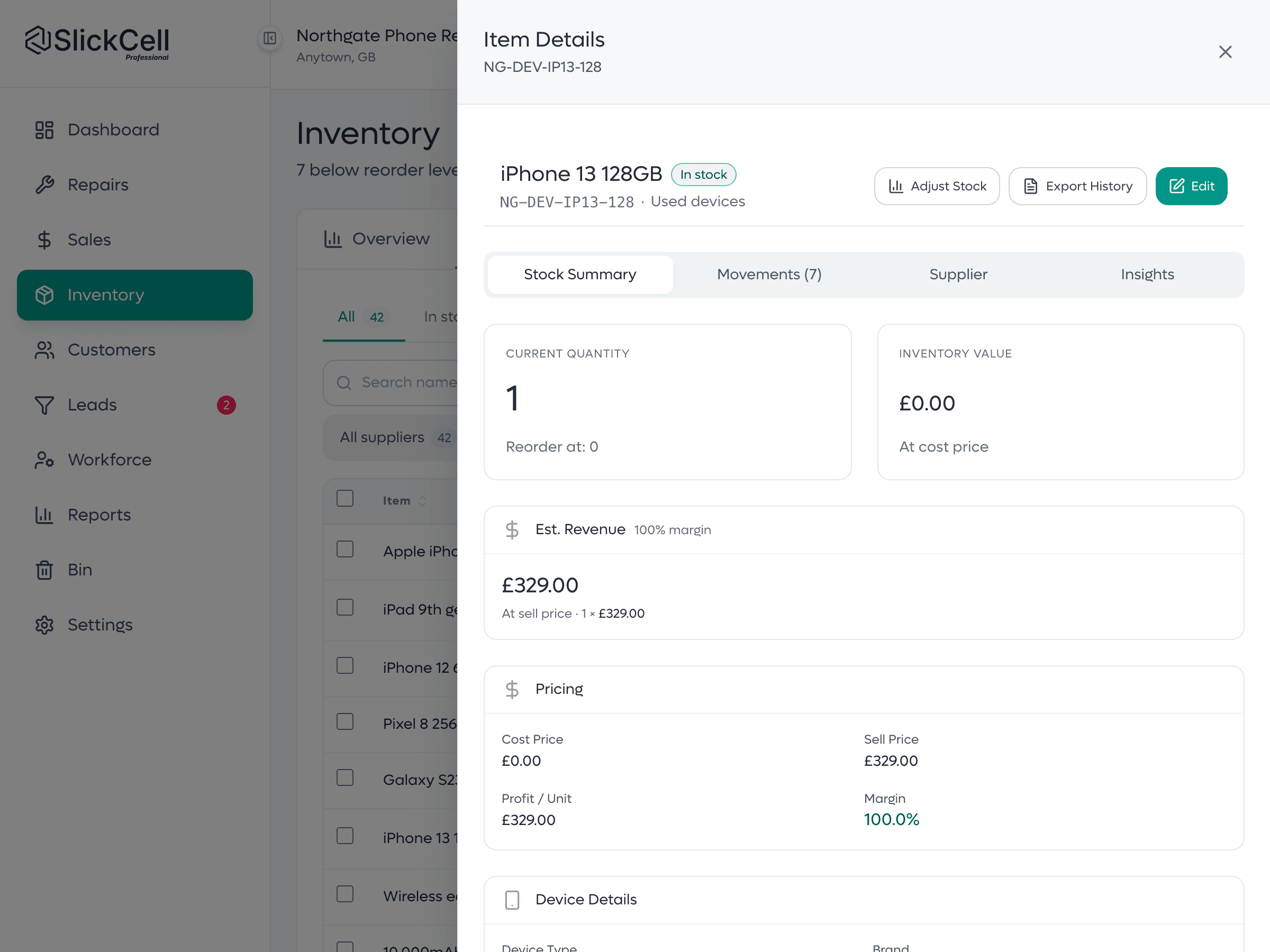
A device unit's history
One unit by IMEI or serial: what it cost, what it sold for, its condition, and the stock ledger that recorded it arriving and leaving.
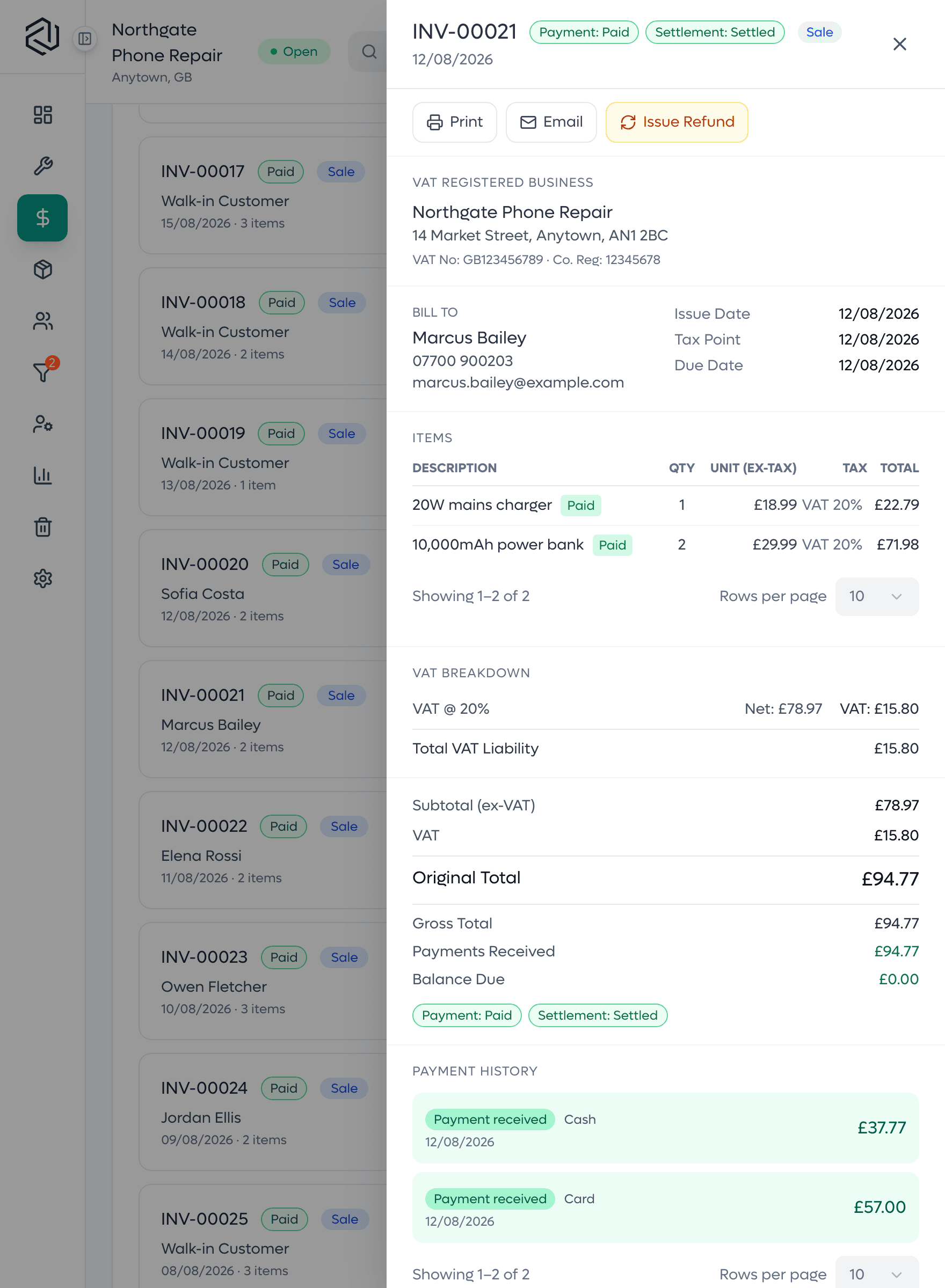
A settled invoice
Each line with its quantity, price and tax, and the payments received against it, so what was charged and what was paid sit on one page.
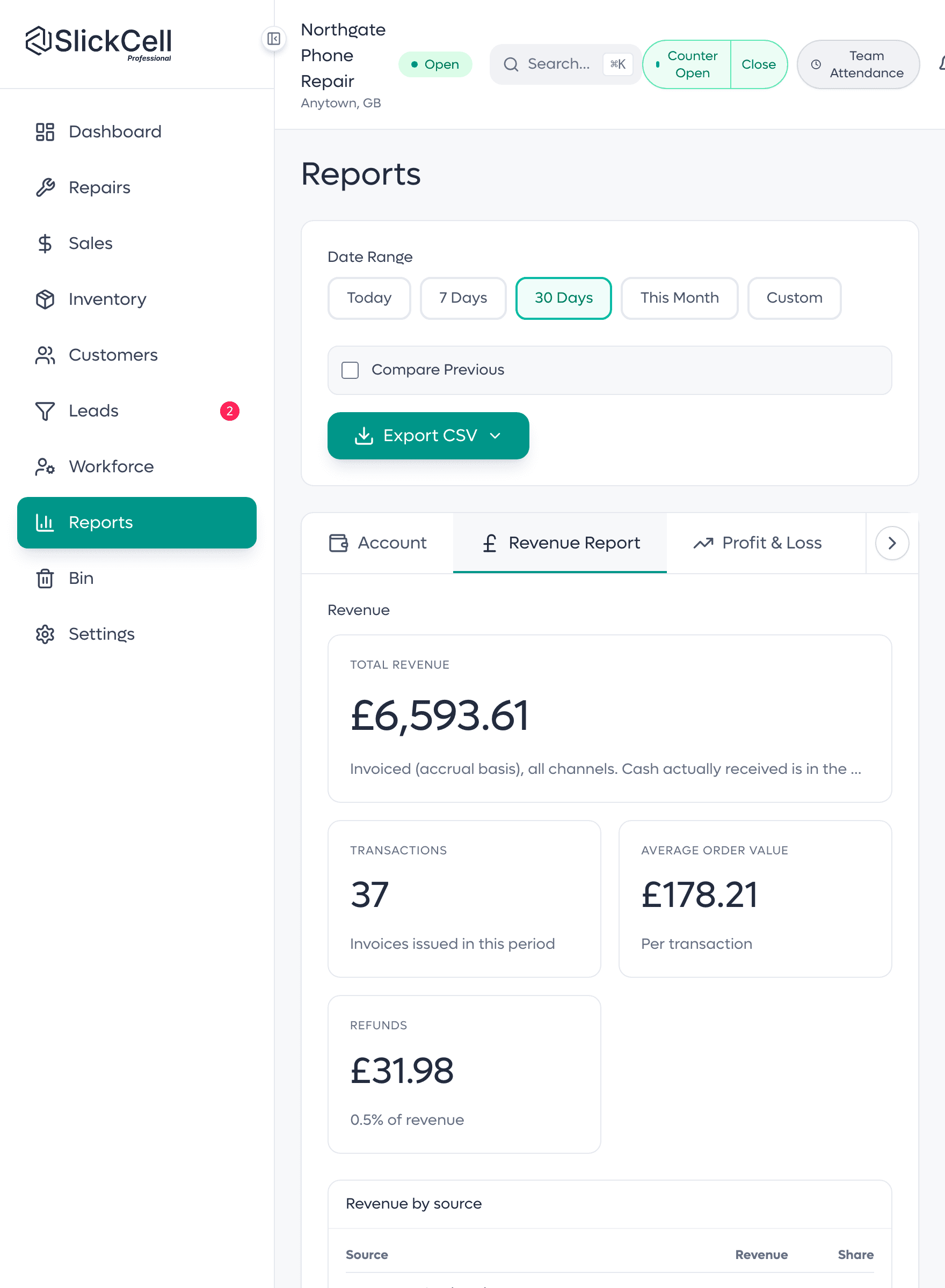
A report total, and its source
The revenue figure and the invoices it is made of, on the same screen. A report is the same number as the invoices, traced, not a separate number typed in.
Customers informed, stock levels right, invoices that add up
What an electronics repair shop owner notices after the first month.
- Repair status without a phone call
- The repair ticket and its label carry a QR code that opens a live tracking page, with no app and no login.
- Updates from the job
- Email a customer from the ticket on a template, and keep the record.
- Stock levels that match
- Parts by quantity, devices by unit, so the shelf and the system agree.
- Quotes that are agreed
- When a quote is approved, the agreed total and how the customer agreed it are recorded on the ticket.
- A month you can close
- Figures open onto the records behind them.
Built for the whole electronics bench
Phones and tablets
IMEI or serial on every unit, with network, battery health and connectivity on the stock record.
Laptops and desktops
Processor, memory, storage and graphics on the stock record.
Games consoles
Storage, edition and controllers on the stock record, and controllers checked in at the counter.
Smartwatches and earbuds
Case size, band, connectivity and charging on the stock record.
Repairs
One ticket per job, with the diagnosis and the quote on it.
Awaiting parts
A real status with the date the job entered it.
Parts by quantity
Screens, batteries, drives and cables counted; devices tracked one by one.
Invoices and the till
Deposits and part payments on the invoice, card and cash split at the till.
Refurbished and traded-in stock
Each device with its own cost, margin and condition.
Customer updates
Email from the job, and a QR tracking page.
Staff rotas and payroll inputs
Shifts, attendance and leave recorded; hours priced into a payslip.
More than one shop
Stock and staff kept per branch, under one login.
What electronics repair shops ask
The questions shops ask before they switch, answered straight.
Yes. Phones, tablets, laptops, desktops and all-in-ones, games consoles, smartwatches, earbuds and headphones are device types in their own right, each with its own brand list. The intake checklist changes with the type, so a laptop is checked for its hinge and keyboard and a console for its controllers. Every device is booked in by its IMEI or serial number.
Yes. Every device is its own record with its own IMEI or serial number, cost, condition, selling price and history. A phone is usually tracked by IMEI; a laptop, console, tablet or smartwatch by its serial number. Both are free text, so a partial or unusual reference from older stock is accepted.
Book it in as Other. It is still its own record with its own serial number, make, model, fault and history, and it runs through the same ticket, stock and invoices as every other device. Other is one of the eight device types, next to phone, tablet, laptop, desktop, games console, smartwatch, and earbuds and headphones.
Starter is £39 a month, Professional £59 and Supplier Pro £99, all excluding VAT, or ten times the monthly price for a year. Every feature is on every plan; plans differ by team size, locations, discount rules and support. Every plan starts with a fourteen-day free trial with no card.
Yes. Every employee has a profile with shifts, attendance and leave, including staff who never sign in. Hours are priced at the pay rate in effect on the day and produce a payslip, which you hand to your payroll provider or accountant for tax and filing. Roles decide what each person can see and do.
Yes. Parts, accessories and devices import from CSV with a preview of exactly what will be written before anything is saved. Most shops finish open repairs on the old system and start new work in SlickCell from go-live.
Yes, from one login, on the Professional plan and above. Each branch keeps its own stock and its own staff, the owner adds branches from the main shop, and every branch can be read together on one dashboard and in the reports. Each extra branch is £39 a month, excluding VAT.
Yes, two ways. Book a demo and we will walk through your own repair and stock workflow on a call, or start the fourteen-day free trial yourself, with no card needed, and book a real device in.
Bring us your mixed bench
A phone, a laptop and a console with a part on order. We will run all three end to end on your own workflow.