

Electronics store POS and stock control
SlickCell is an electronics store POS for laptops, tablets, phones and consoles sold as individual units by serial number or IMEI, and cables, cases and chargers counted by the box. One till and one drawer for both.
An electronics store EPOS for devices and accessories
SlickCell is built for shops that sell laptops, tablets, phones, games consoles, smartwatches and headphones, and the cables, cases and chargers that go with them. Each device is its own unit with its own serial number or IMEI, its own cost and its own price, so the laptop that leaves the shop is the exact one on the receipt. Accessories are the other shape: counted by quantity and scanned off a barcode. Card and cash can be split across one sale, a trade-in goes into stock at its real cost, and the drawer closes on a count. In the UK this is usually called an EPOS; in the US, electronics store POS or electronic shop management software. Repairs, when you take them, run on a repair ticket in the same system and are paid into the same drawer. From £39 a month excluding VAT.
Ten o'clock. A refurbished laptop goes out with a sleeve and a mouse. The laptop is sold as itself, by its serial number, with its own cost behind the sale; the sleeve and the mouse come off a quantity.
Midday. A customer trades in a tablet against a new one. It is costed and graded at the counter and goes into stock as its own unit. At close the drawer is counted against what the till says it should hold, and any difference is a figure, not an argument.
Point of sale and stock control in one
From the first scan to the counted drawer, each step writes to the next.
- 01ScannedAccessories off a barcode, devices by serial or IMEI.
- 02PaidCard, cash or both on one sale, change recorded.
- 03Traded inCosted, graded and on the shelf as a unit.
- 04ReturnedYou choose where each returned item goes: the shelf, the supplier, or a holding area to be checked.
- 05CountedThe drawer closed on a count, the difference visible.
- 06ReportedThe day's revenue opens onto the sales it came from.
A staff phone can be paired to the till from a QR code and used as the scanner for the open sale.
Serial numbers and sales you can check
Real screens from the product, whose figures check against each other.
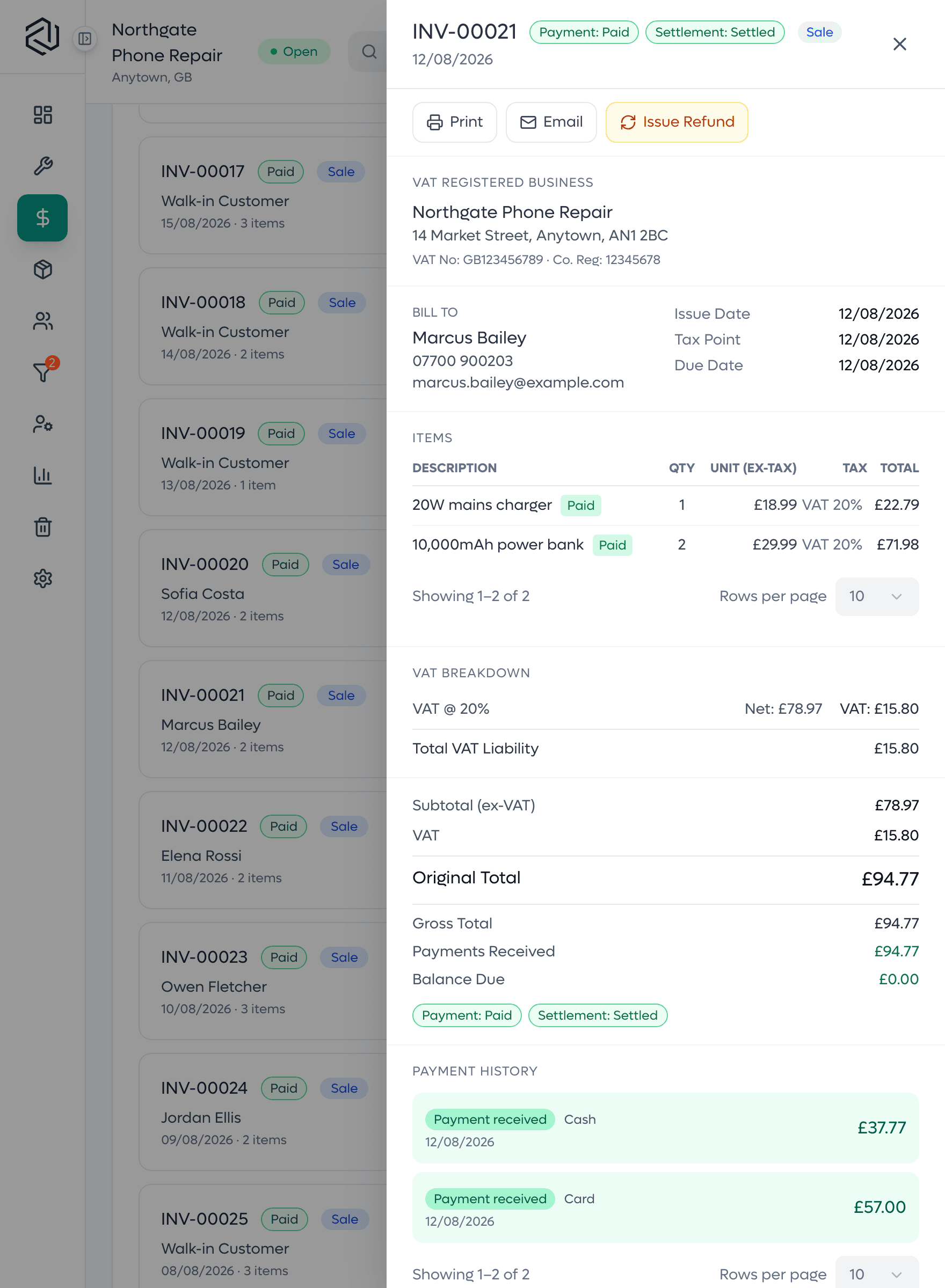
A settled invoice
One sale with each line's quantity, price and tax, and the payments received against it. The payments add up to the total, so what was charged and what was paid sit on one page.

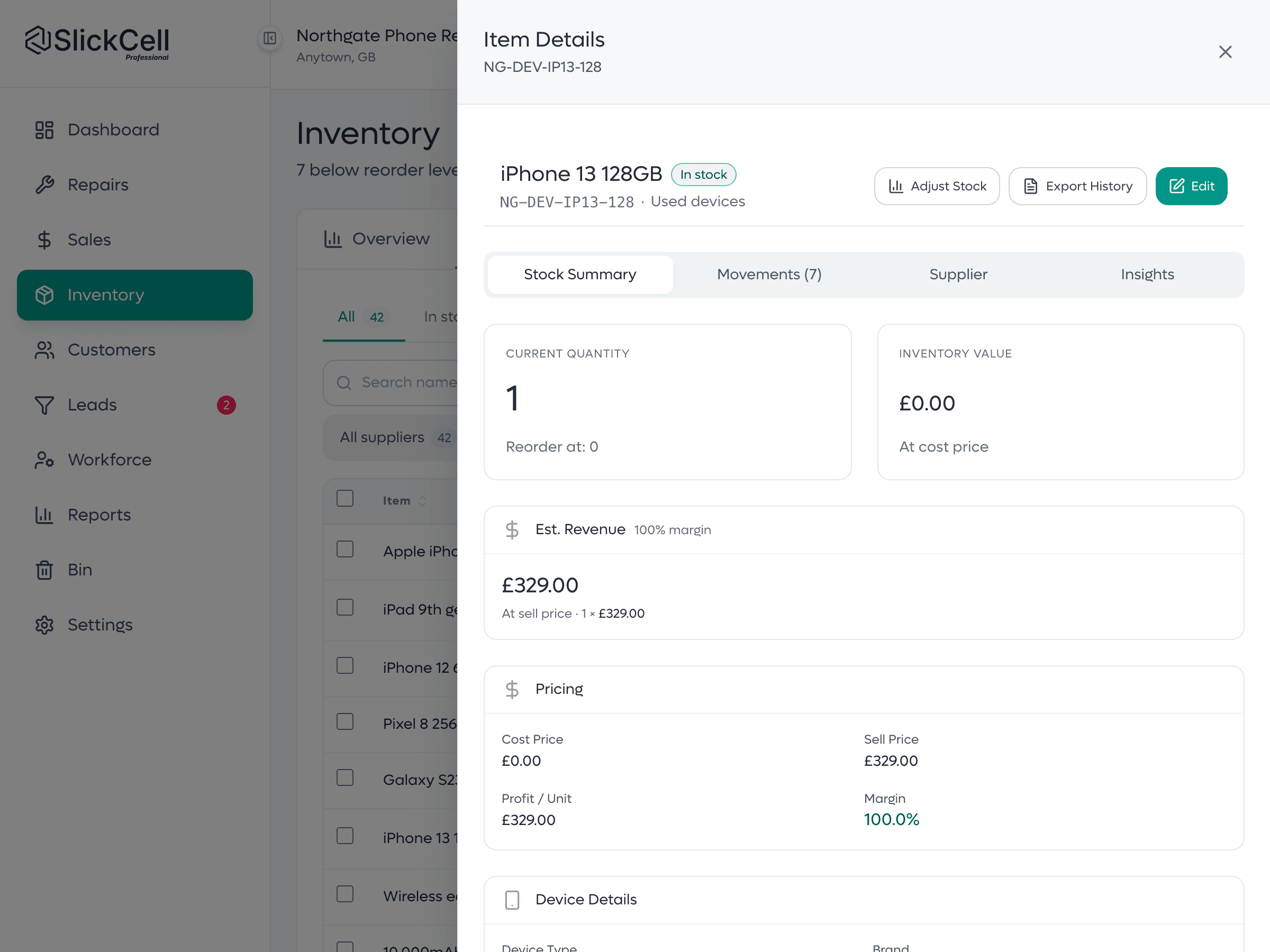
A device unit's history
One device by serial or IMEI: what it cost, what it sold for, its condition, and the stock ledger that recorded it arriving and leaving.
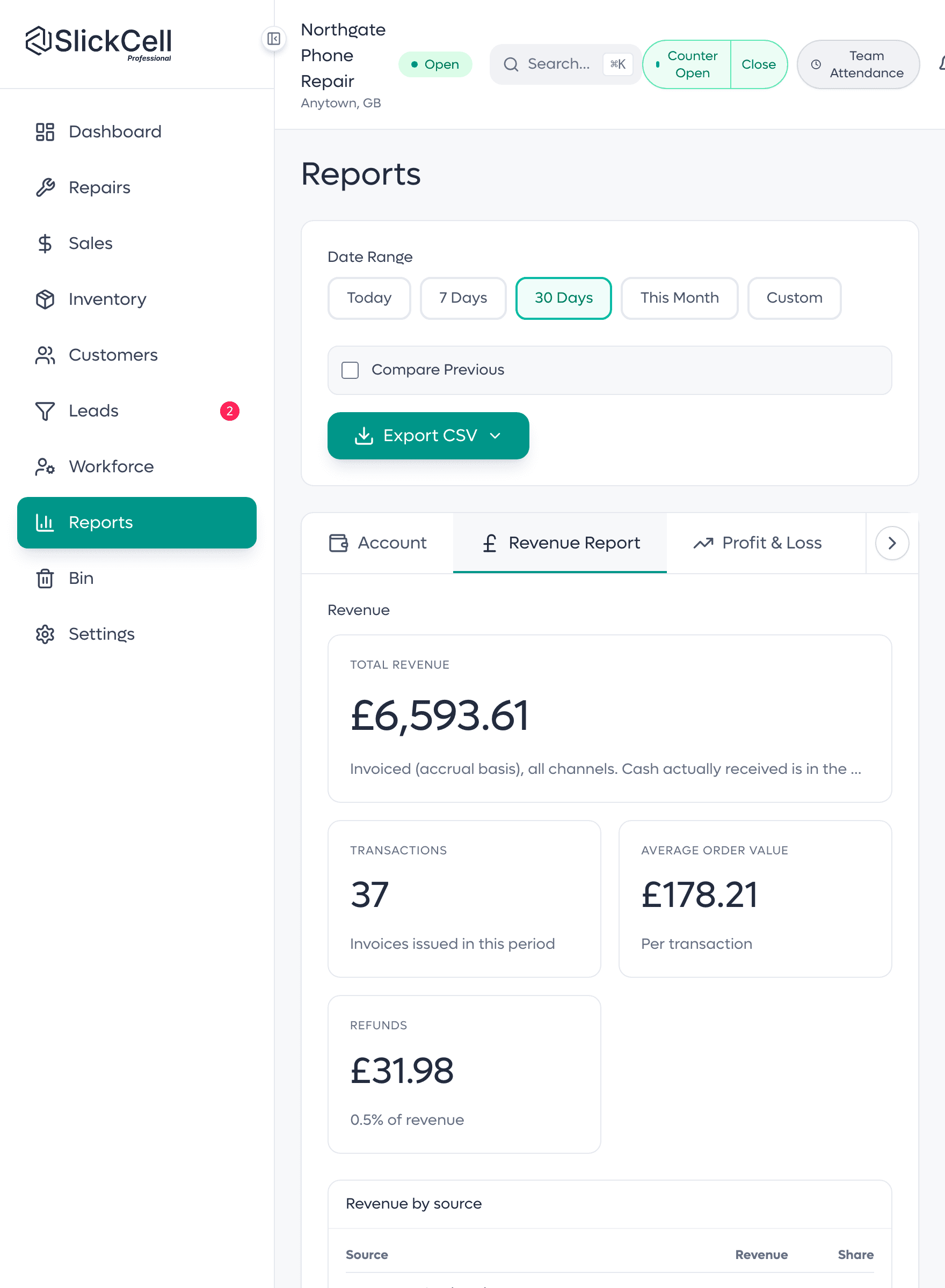
A report total, and its source
The day's revenue and the sales it is made of, on the same screen. The rows add up to the total, so the report is the till, traced.
A drawer that reconciles and a shelf that matches
What an electronics shop owner notices after the first month.
- The drawer reconciles
- Opened on a float, closed on a count.
- The shelf matches
- Accessories by quantity, devices by unit.
- Used stock is costed
- Each second-hand device carries its own cost, so its margin is real.
- Returns are decided
- Each returned item gets an outcome someone chose, and a doubtful one waits in a holding area until it is checked.
- Purchase history on the customer
- Sales, payments and refunds hang off the customer record.
EPOS hardware: use what you already have
A scanner, a printer and a card machine, the ones already on your counter.
- Barcode scanner
- Any USB barcode scanner that types into the till works as it would in any other program. And a staff phone can be paired to the till from a QR code on screen and used as a scanner for the open sale, with no app to install and no hardware to buy.
- Receipt, invoice and label printer
- One document template prints as an A4 page, an 80mm or 58mm receipt roll, or a repair label on stock sizes from 50 by 25 up to 80mm, and the same document downloads as a PDF. Printing goes through the browser's own print dialog, so any printer the computer can already print to will work. SlickCell itself installs nothing.
- Card machine
- Keep the card machine you already have, from whichever provider gives you the best rate. Take the payment on the terminal and the till records it on the sale, split with cash if needed, so the sale, the receipt and the day's report agree. SlickCell takes no cut of your card takings.
An electronics shop till, built for serialised stock
The till
Devices and accessories on one sale, with card and cash split.
Scan to sell
A USB scanner, or a staff phone paired to the till.
Accessories by quantity
Cases, cables and chargers counted by the box.
Devices by unit
Every laptop, tablet, phone or console its own record by serial or IMEI.
Used and refurbished
Cost, margin and margin-scheme tax held per device.
Trade-ins
Take a device in against a sale and stock it at its real cost.
Discount rules
Start, expiry, usage limit and cart minimum, checked on the server. Professional and above.
Cash drawer
Float, count, difference.
Controlled returns
Every returned item has a destination someone chose.
Reorder levels
Accessories at or below their reorder level are listed, ready for a purchase order.
Staff rotas and payroll inputs
Shifts, attendance and leave recorded; hours priced into a payslip.
More than one shop
Stock and staff kept per branch.
What electronics shop owners ask
The questions shops ask before they switch, answered straight.
EPOS means electronic point of sale: the till, plus the stock and sales records behind it. In SlickCell the till, stock by serial or IMEI, accessories by quantity, trade-ins, the cash drawer and the reports are one system, so a sale moves the stock and the figures in the same step.
Yes. Every device is its own record with its own IMEI or serial number, cost, condition, selling price and history. A phone is usually tracked by IMEI; a laptop, console, tablet or smartwatch by its serial number. Both are free text, so a partial or unusual reference from older stock is accepted.
Yes, with the one you already have. Take the payment on your terminal and the till records it on the sale, split with cash if needed. SlickCell takes no cut of your card takings.
Yes. SlickCell runs in a modern browser on the shop's computer, a tablet or a phone, with nothing to install. A USB barcode scanner works at the till as it does in any other program, and a staff phone can be paired to the till as a scanner for the open sale.
Starter is £39 a month, Professional £59 and Supplier Pro £99, all excluding VAT, or ten times the monthly price for a year. Every feature is on every plan; plans differ by team size, locations, discount rules and support. Every plan starts with a fourteen-day free trial with no card.
Yes. Tax is a rule you configure, and margin is one of the rule types, scoped to used stock. Each device carries its own purchase cost, so the margin on every sale is worked out from that unit, and margin-taxed sales are reported separately from standard-rated ones.
Yes, from one login, on the Professional plan and above. Each branch keeps its own stock and its own staff, the owner adds branches from the main shop, and every branch can be read together on one dashboard and in the reports. Each extra branch is £39 a month, excluding VAT.
Yes. Every employee has a profile with shifts, attendance and leave, including staff who never sign in. Hours are priced at the pay rate in effect on the day and produce a payslip, which you hand to your payroll provider or accountant for tax and filing. Roles decide what each person can see and do.
See the till on your own Saturday
A laptop by serial, a box of cables, a trade-in and a counted drawer. We will run the day end to end.