

POS system for phone shops
A shop that sells phones, cases and chargers all day, and takes the odd repair, needs a till first. This one counts accessories by the box and tracks every phone on its own.
Forty sales before lunch
SlickCell is a POS system for phone shops: the till, the stock and the cash drawer in one web app. Cases, screen protectors and chargers are scanned off a barcode and counted by quantity. Every handset is its own unit with its own IMEI or serial number, cost, condition and price, so a refurbished phone sells as itself and not as one of a count. Trade-ins go into stock at their real cost, second-hand sales can use the UK VAT margin scheme, and the drawer closes on a count. In the US the same thing is searched for as cell phone store POS software; in the UK it is usually called a phone shop EPOS. From £39 a month excluding VAT, hosted in London.
Nine o'clock. A case, a screen protector and a charging cable go through in one sale, scanned off the shelf, each coming off a quantity. The next customer buys a refurbished handset: that one is a single unit with its own IMEI or serial number, its own cost and its own price, and it leaves stock as itself rather than as one of a count.
Half ten. A regular asks for money off. The assistant on the till picks a discount the shop has defined, with a start date, an expiry, a usage limit and a cart minimum, and the server checks all four before it is applied. There is no free-text box for knocking a tenner off.
Midday. A customer trades in their old handset against a new one. It is costed and graded there and then and goes into stock as a unit, ready to sell. At close the drawer is counted against what the till says it should hold, and the difference, if there is one, is a figure rather than an argument.
Point of sale for a phone store, from scan to count
From the first scan to the counted drawer, each step writes to the next.
- 01ScannedAccessories off a barcode, handsets by their IMEI or serial.
- 02DiscountedFrom a rule the shop defined, checked on the server.
- 03PaidCard, cash, or both against one sale, with change recorded.
- 04Traded inCosted, graded and on the shelf as a unit.
- 05ReorderedAccessories below their reorder level show up for a purchase order.
- 06CountedThe drawer closed on a count, the difference visible.
A staff phone can be paired to the till from a QR code and used as a scanner for the open sale, so a busy counter does not need a second scanner bought for it.
EPOS hardware: use what you already have
A scanner, a printer and a card machine, the ones already on your counter.
- Barcode scanner
- Any USB barcode scanner that types into the till works as it would in any other program. And a staff phone can be paired to the till from a QR code on screen and used as a scanner for the open sale, with no app to install and no hardware to buy.
- Receipt, invoice and label printer
- One document template prints as an A4 page, an 80mm or 58mm receipt roll, or a repair label on stock sizes from 50 by 25 up to 80mm, and the same document downloads as a PDF. Printing goes through the browser's own print dialog, so any printer the computer can already print to will work. SlickCell itself installs nothing.
- Card machine
- Keep the card machine you already have, from whichever provider gives you the best rate. Take the payment on the terminal and the till records it on the sale, split with cash if needed, so the sale, the receipt and the day's report agree. SlickCell takes no cut of your card takings.
Sales data you can check against the till
Real screens from the product, whose figures check against each other.
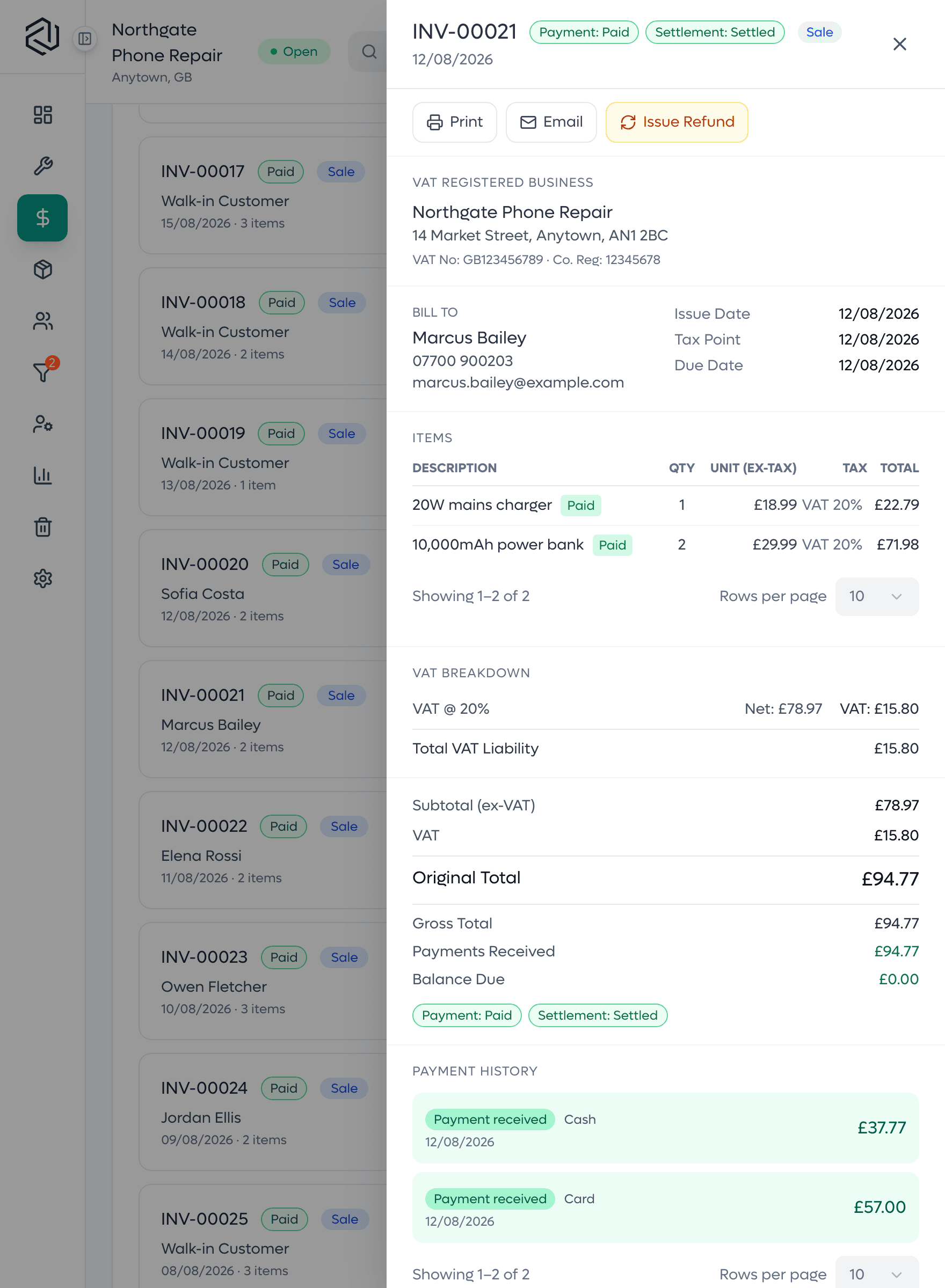
A split-payment receipt
One sale settled across card and cash. The tenders add up to the total, the change is what went back over the counter, and the balance lands on zero: the case where money usually goes missing.

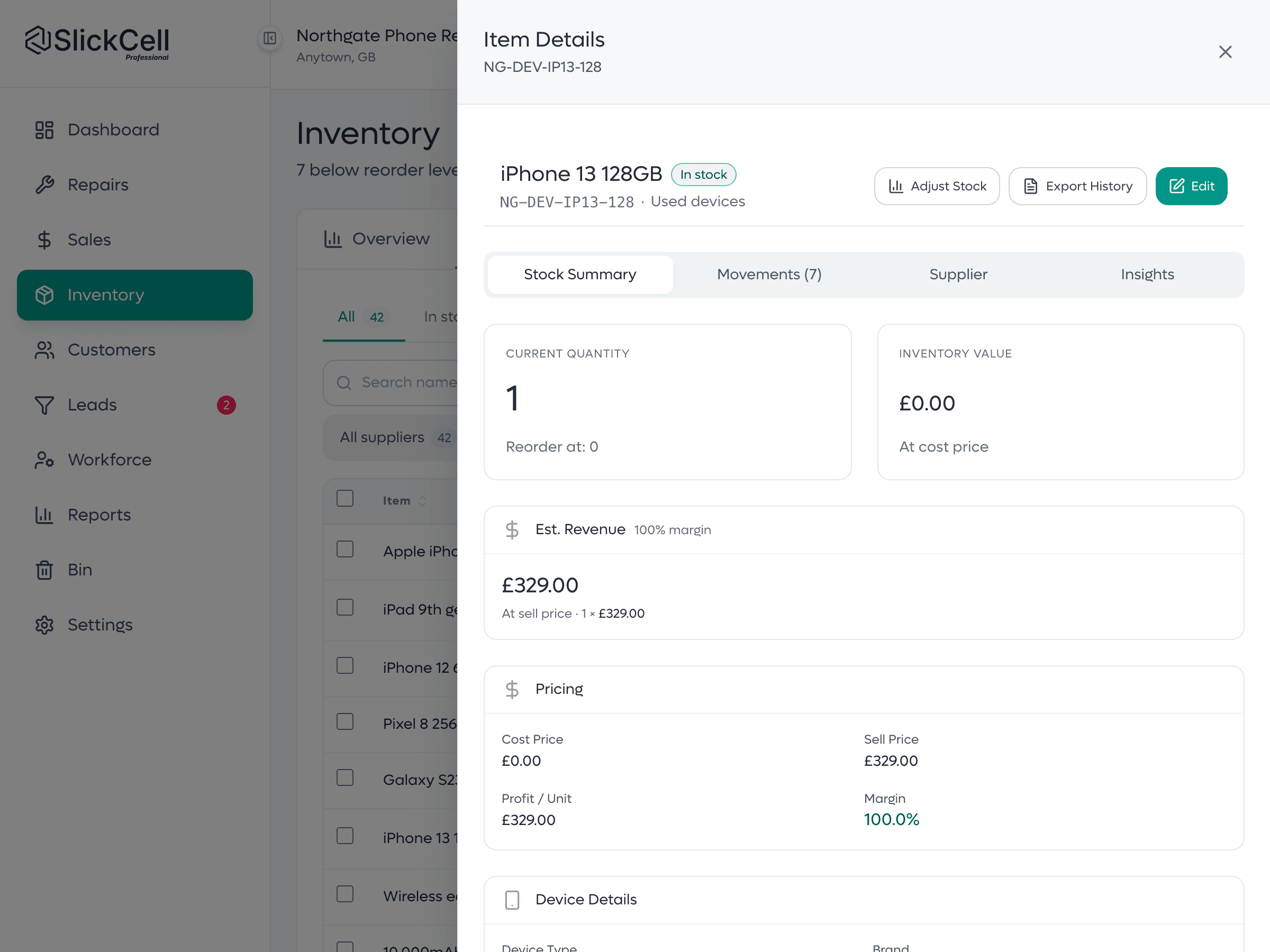
A device unit's history
One handset by IMEI or serial: what it cost, what it sold for, its condition, and the stock ledger that recorded it arriving and leaving. Quantity is derived from units, never typed.
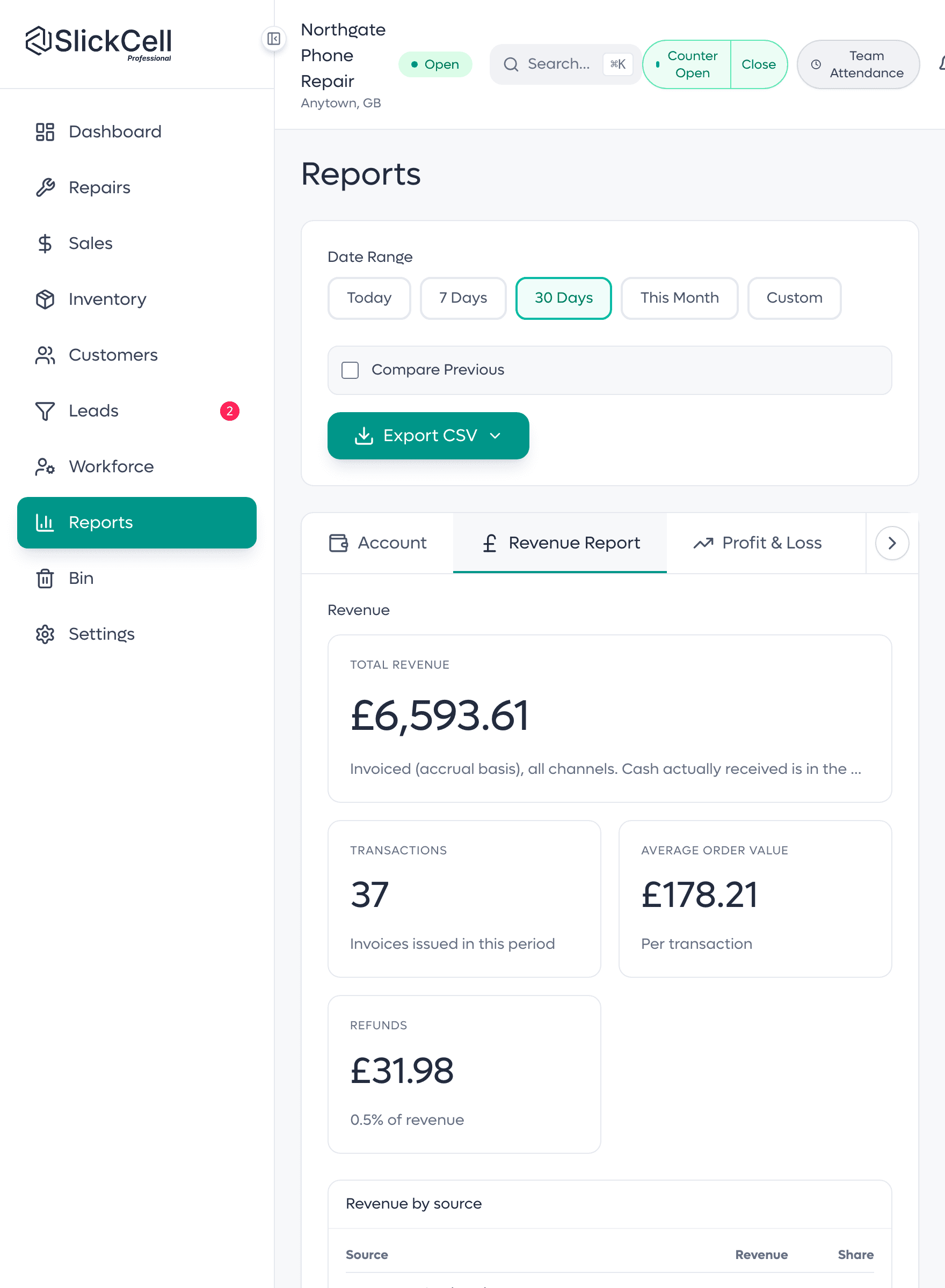
A report total, and its source
The day's revenue and the sales it is made of, on the same screen. The rows add up to the total exactly, so the report is the till, traced.
A drawer that reconciles, a shelf that matches, discounts you can see
What a phone shop owner notices after the first month.
- The drawer reconciles
- Opened on a float, closed on a count, with the difference shown rather than guessed.
- The shelf matches
- Accessories by quantity, handsets by unit, so the system and the stockroom stop drifting apart.
- Discounts are rules
- Each has a start, an expiry, a usage limit and a cart minimum, and the server enforces them.
- Used stock is costed
- Each second-hand handset carries its own cost, so the margin on it is real.
- Reorders are not guessed
- Fast-moving accessories fall below their reorder level and show up to be ordered.
Phone shop EPOS software: what the till carries
The till
Accessories, handsets and repairs on one sale, with split tender.
Scan to sell
Barcodes for accessories; a staff phone can be the scanner.
Accessories by quantity
Cases, cables and chargers counted by the box, with reorder levels.
Handsets by unit
Every device its own record with its own IMEI or serial number, cost and price.
Used devices
Cost, margin and margin-scheme tax held per handset.
Trade-ins
Take a handset in against a sale and put it on the shelf as stock.
Discounts as rules
Defined once, with expiry and usage limits, applied at the till. Professional and above.
Cash drawer
Open on a float, close on a count, see the difference.
Invoices & payments
Part payments, corrections and refunds as one financial history.
Repairs when you take them
A repair ticket sits beside the sale, not in a separate system.
Stocktake
Count against a snapshot; stock moves only once approved.
More than one shop
One login across branches, with stock and staff kept per branch.
What phone shop owners ask
The questions shops ask before they switch, answered straight.
It is both, and the till is not an afterthought: accessories are scanned off a quantity, handsets are sold as individual units, and card and cash can be split across one sale. Repairs sit beside sales on the same record rather than in a second system, which suits a shop that sells most of the day and fixes some of it.
EPOS means electronic point of sale: the till, plus the stock and sales records behind it. In SlickCell the till, stock by serial or IMEI, accessories by quantity, trade-ins, the cash drawer and the reports are one system, so a sale moves the stock and the figures in the same step.
Handsets, yes, because two of the same model bought for different money are not the same stock, and the margin on a used one is only real if its own cost is known. Accessories are the opposite: a box of cases is a quantity with a reorder level. The system holds both shapes at once.
On Professional and above, discounts are rules the shop defines rather than an amount typed at the till. Each rule has a start date, an expiry, a usage limit and a cart minimum, and the server checks all four when it is applied, so a discount that has run out cannot be given again. Staff choose from the rules that exist; they do not invent one.
Yes. Any USB barcode scanner that types into the till works as it would in any other program. And a staff phone can be paired to the till from a QR code on screen and used as a scanner for the open sale, with no app to install and no hardware to buy.
Yes, with the one you already have. Take the payment on your terminal and the till records it on the sale, split with cash if needed. SlickCell takes no cut of your card takings.
Starter is £39 a month, Professional £59 and Supplier Pro £99, all excluding VAT, or ten times the monthly price for a year. Every feature is on every plan; plans differ by team size, locations, discount rules and support. Every plan starts with a fourteen-day free trial with no card.
Yes. Tax is a rule you configure, and margin is one of the rule types, scoped to used stock. Each device carries its own purchase cost, so the margin on every sale is worked out from that unit, and margin-taxed sales are reported separately from standard-rated ones.
See the till on your own Saturday
Accessories by the box, a refurbished handset, a trade-in and a counted drawer. We will run the whole day end to end.