

Tablet repair shop software for iPad and Android repairs
SlickCell is tablet repair shop software that takes a serial number or an IMEI at booking, whichever the tablet shows, and sells each refurbished tablet as its own unit, with its generation and connectivity on the record.
An iPad with a cracked screen, and a trade-in on the counter
SlickCell is built for UK shops that repair iPads and Android tablets as well as phones, laptops and consoles. Tablet is a device type of its own, with more than 550 tablet models to pick from once it is chosen, and a tablet never suggests phone models. At booking, one field takes the serial number or the IMEI, whichever the tablet shows, so a Wi-Fi-only iPad is booked by its serial and a cellular one by its IMEI or serial. Surface Pro, Surface Go and Amazon Fire are in the tablet list; Surface Laptop and Surface Book are in the laptop list. The job moves through quote sent, awaiting parts and completed on one ticket. A refurbished tablet you sell is its own stock unit with its own IMEI or serial, cost, condition and price, and if you bought it second-hand the VAT margin scheme is worked out from that unit's own cost.
Saturday morning an iPad comes in with a cracked screen. It is booked as a Tablet, the model is picked from the Apple tablet list, where older iPads are listed separately as Wi-Fi and Wi-Fi + Cellular models, and its serial number goes in the one identifier field, because a Wi-Fi-only iPad has no IMEI to give.
A quote for a new screen and digitiser goes to the customer, and the ticket waits at Quote Sent until they approve it. The screen is not on the shelf, so the job sits in Awaiting Parts until it arrives. Fitting it takes the part off stock and onto the ticket.
At collection the customer trades in an old cellular tablet. It is recorded as a buyback with device type Tablet, its IMEI or serial in its own field, and its connectivity, screen size and generation beside it. Once it is approved and paid for, it enters stock as its own unit at what you paid, ready to sell under the margin scheme.
The modules that made it happen
RepairsTrade-insUsed devices & the margin schemeInventory & device unitsPoint of saleVAT margin calculator
Booked by IMEI or serial, sold as a unit
The states a tablet passes through, from the counter to the bench and back to the shelf.
- 01Booked inDevice type Tablet, the model from the tablet list, and the serial or IMEI.
- 02QuotedPriced before the work and approved before the part is ordered.
- 03Awaiting partsA status of its own, so a job waiting on a screen is visible in the queue.
- 04RepairedParts used come off stock and onto the job.
- 05CollectedAny deposit taken at booking counts against the bill.
- 06Refurbished and soldA traded-in tablet is sold as its own unit, at its own cost.
The customer hears how the job is going by email, and every receipt and repair label carries a QR code that opens a live tracking page, with no app and no login.
The screens a tablet passes through
Real captures from the product: the booking step, the stock unit and the tax rule.

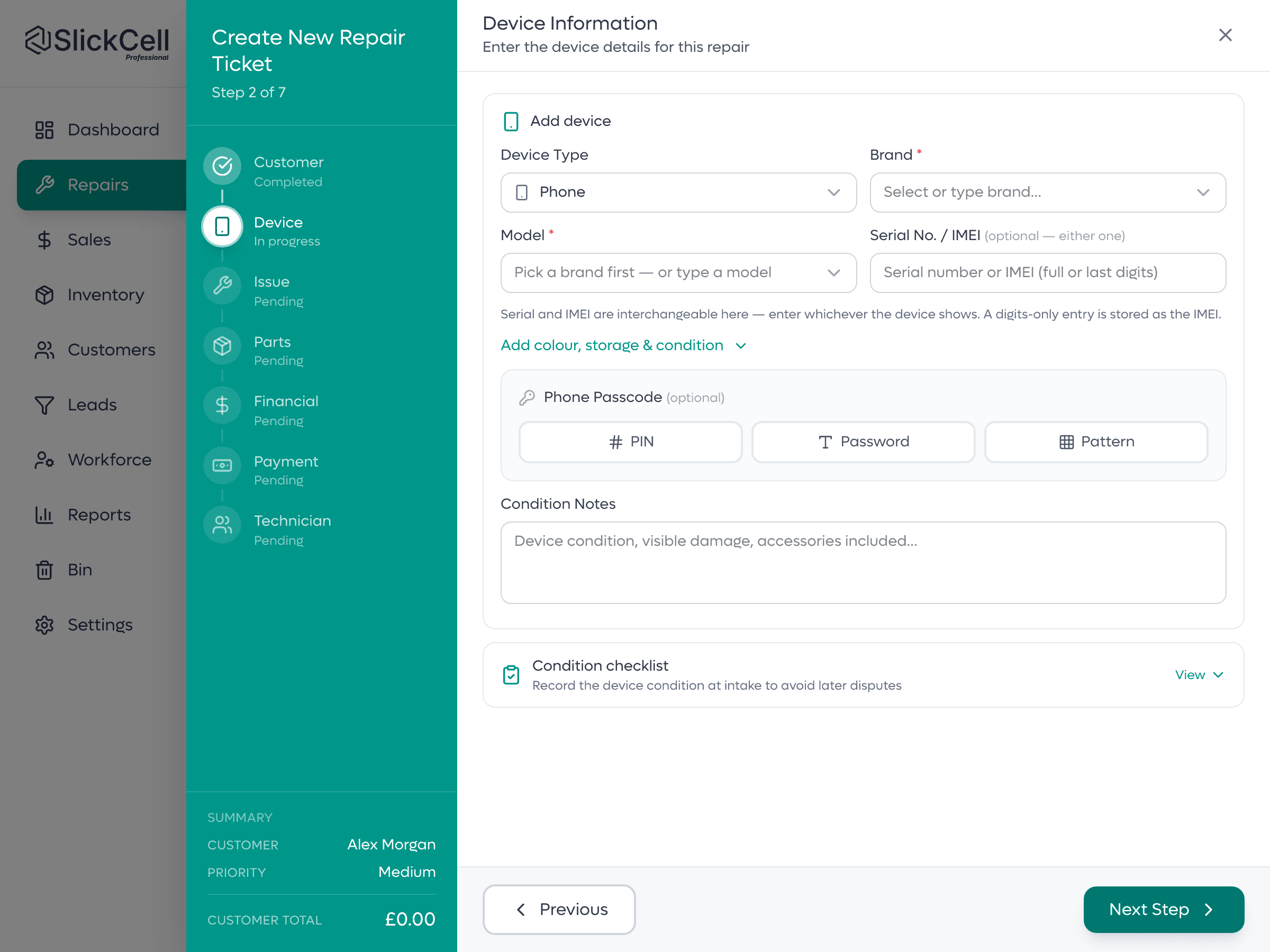
One field for serial or IMEI
Step two of a new ticket. Choose the device type first and the brand and model lists follow it. The serial number or IMEI goes in one field, whichever the device shows, in full or just the last digits.

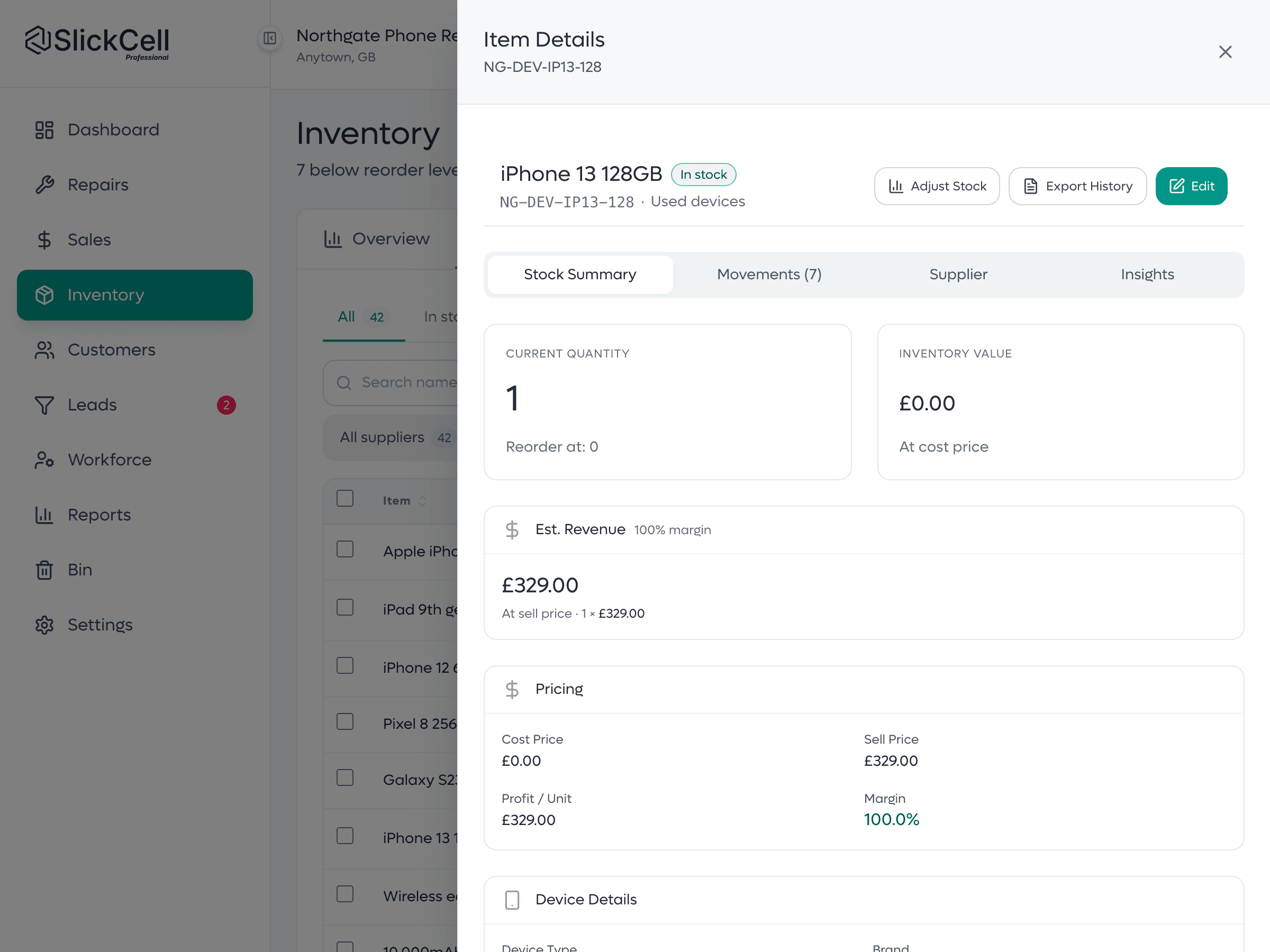
A refurbished tablet, unit by unit
Each unit you stock has its own IMEI or serial number, storage, colour, condition, cost and selling price. A tablet unit also carries connectivity, screen size and generation.
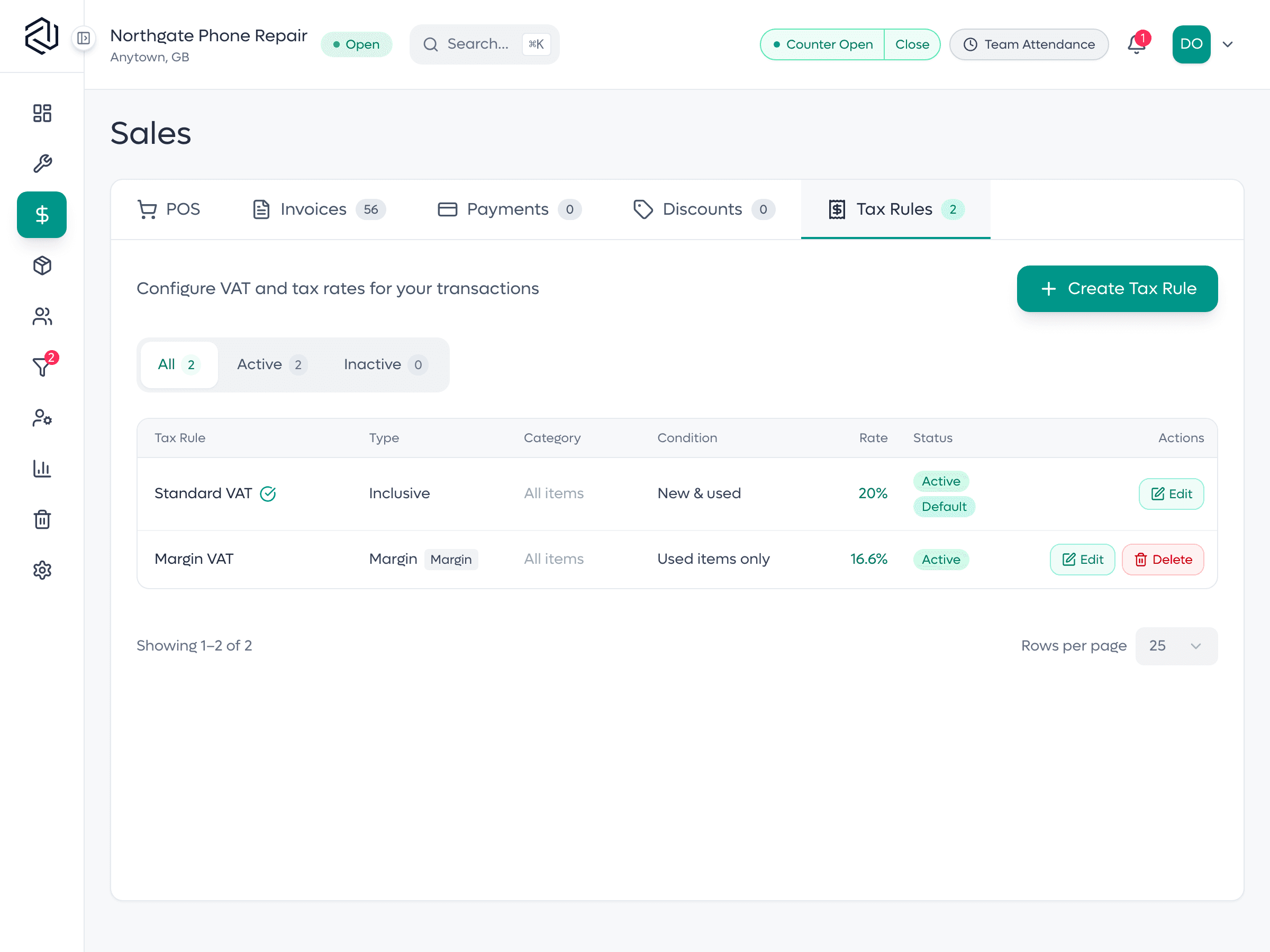
The margin scheme as a rule
A standard rate as the default, and a margin rule scoped to used stock. A second-hand tablet sold under it is taxed on the margin between what that unit cost you and what it sold for.
The right model, the right number, the right margin
What a tablet shop owner notices after the first month.
- The right model list
- Pick Tablet and the model list holds tablets only, with older iPads split into Wi-Fi and Wi-Fi + Cellular models.
- Wi-Fi tablets book in cleanly
- The serial goes in the same field an IMEI would, so nothing is left blank.
- Trade-ins with the details that price them
- Connectivity, screen size and generation sit on the buyback record beside the IMEI or serial.
- Tablets in their own stock category
- A tablet you stock defaults to the Tablets category, and the stock list filters on it.
- Margin from the unit's own cost
- A second-hand tablet's margin comes from what you paid for that one unit.
Built for the bench and the counter
Repairs
Screen and digitiser replacements, batteries and charging ports: one ticket per job, with the quote on it.
Awaiting parts
A real status with a date, so a tablet waiting on a screen is never a note on the bench.
Wi-Fi or cellular
Connectivity, screen size and generation on every tablet you stock or buy in.
Surface and Fire included
Surface Pro, Surface Go and Amazon Fire are in the tablet list; Surface Laptop and Surface Book are laptops.
Parts by quantity
Screens, batteries and charging ports counted; tablets tracked one by one.
Trade-ins
Buy a tablet from a customer, inspect it, pay, and it enters stock at its real cost.
Margin scheme per unit
Second-hand tablets taxed on the margin, worked out from each unit's own cost.
A till for the counter
Repairs, accessories and refurbished tablets on one sale, split across card and cash.
Find a unit fast
Search stock by name, category, IMEI or serial number.
Customer updates
Email from the job, and a QR code on every receipt that opens live tracking.
What tablet shop owners ask
The questions shops ask before they switch, answered straight.
Yes. The booking field takes a serial number or an IMEI, whichever the tablet shows, in full or just the last digits. A serial with letters in it is saved as a serial number. For a tablet you stock or buy in, Connectivity (Wi-Fi, or Wi-Fi and cellular) is a field on the record, beside screen size and generation.
Yes. Every device is its own record with its own IMEI or serial number, cost, condition, selling price and history. A phone is usually tracked by IMEI; a laptop, console, tablet or smartwatch by its serial number. Both are free text, so a partial or unusual reference from older stock is accepted.
Yes. SlickCell is web-based and runs in any modern browser on a computer, tablet or phone, so there is nothing to install on the iPad. Sign in at the counter and the same shop, repair queue and till are there as on any other device.
Yes. Tax is a rule you configure, and margin is one of the rule types, scoped to used stock. Each device carries its own purchase cost, so the margin on every sale is worked out from that unit, and margin-taxed sales are reported separately from standard-rated ones.
Starter is £39 a month, Professional £59 and Supplier Pro £99, all excluding VAT, or ten times the monthly price for a year. Every feature is on every plan; plans differ by team size, locations, discount rules and support. Every plan starts with a fourteen-day free trial with no card.
Bring us a tablet job
An iPad that needed a screen, and a tablet traded in at the counter. We will run both end to end on your own workflow.