

Mobile phone repair shop software
SlickCell is built around the way a repair shop actually runs: a counter with a queue, a bench with parts on it, and a drawer of phones that all cost something different.
One morning, start to finish
SlickCell is mobile phone repair shop software: repair tickets, a till that understands repairs, stock tracked by IMEI or serial number, trade-ins and the UK VAT margin scheme in one web app. A screen repair is booked in on one ticket, the part is reserved from stock, a deposit is taken against the job, and the balance settles at the same till that sells cases and refurbished phones. Customers check the repair status from a QR code on their receipt. In the US the same thing is searched for as cell phone repair shop software. It runs in any browser on a computer, tablet or phone, it is hosted in London, and it costs from £39 a month excluding VAT.
Ten past nine. A cracked screen comes in, and the customer leaves a deposit against the job rather than a promise. The part is checked, it is on the shelf, and it is reserved to that ticket, so the same screen cannot be sold out from under the repair at the counter an hour later.
By eleven the technician finds the battery is going too. That is quoted, sent to the customer, and approved before anyone touches it, so the extra cost is agreed rather than discovered at collection. At half twelve the phone is handed back, the balance settles against the deposit already taken, and the receipt shows what was paid and how.
The handset the customer traded in is costed, graded and listed by lunchtime, as its own unit, with its own price.
The modules that made it happen
RepairsPOS & SalesInventory & device unitsInvoicing & paymentsPurchase orders & receivingReports & taxUsed devicesTrade-in & buybackWorkforceMulti-branchCustomersSupplier networkCustomer trackingElectronics repair shopsFree repair shop softwareStarting a repair business
Repair ticket management, from booking to handover
Each step wrote to the next. Nothing in that morning was retyped, and nothing was held together by someone remembering it.
- 01Booked inDevice, fault and customer on one ticket.
- 02DepositMoney against the job, not a note on a pad.
- 03Part reservedCommitted to that ticket so it cannot be sold twice.
- 04Extra work quotedQuoted on the ticket before the cost lands.
- 05Balance settledThe deposit counts; what is left is a real figure.
- 06Trade-in listedCosted and graded as its own unit, ready to sell.
A part used reduces stock, the stock movement lands in cost of goods, and cost of goods lands in the month's profit: which is why the trade-in you took at half twelve is already costed when you look at the figures on Friday.
Repair tracking and payments you can inspect
Not a quote from a shop you cannot ring. Three artefacts, in real markup, whose figures check against each other.
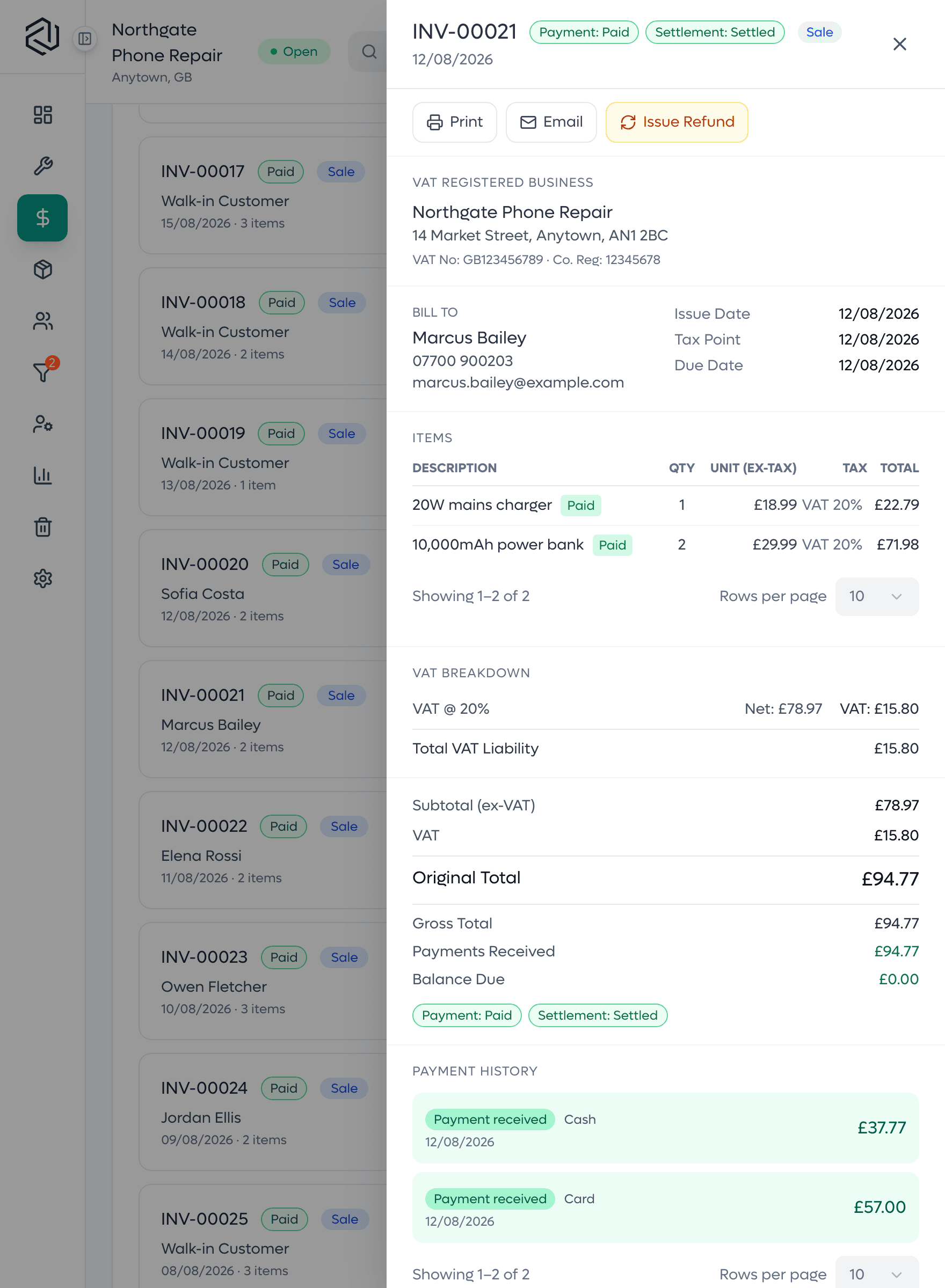
A split-payment receipt
One sale settled across card and cash. The tenders add up to the total, the change is what went back over the counter, and the balance lands on zero: the case where money usually goes missing.

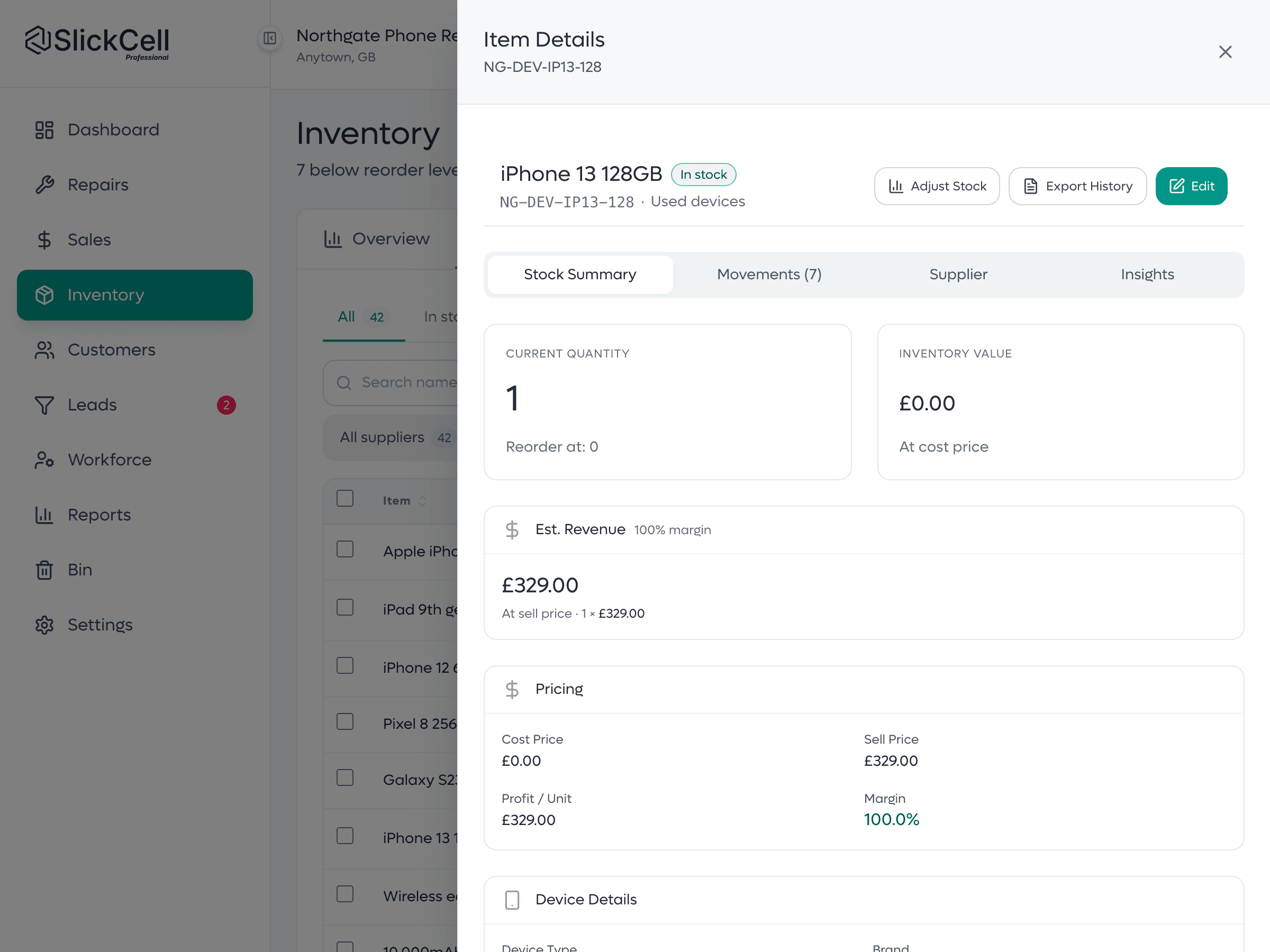
A device unit's history
One handset by IMEI or serial: what it cost, what it sold for, its condition, and the stock ledger that recorded it arriving and leaving. Quantity is derived from units, never typed.
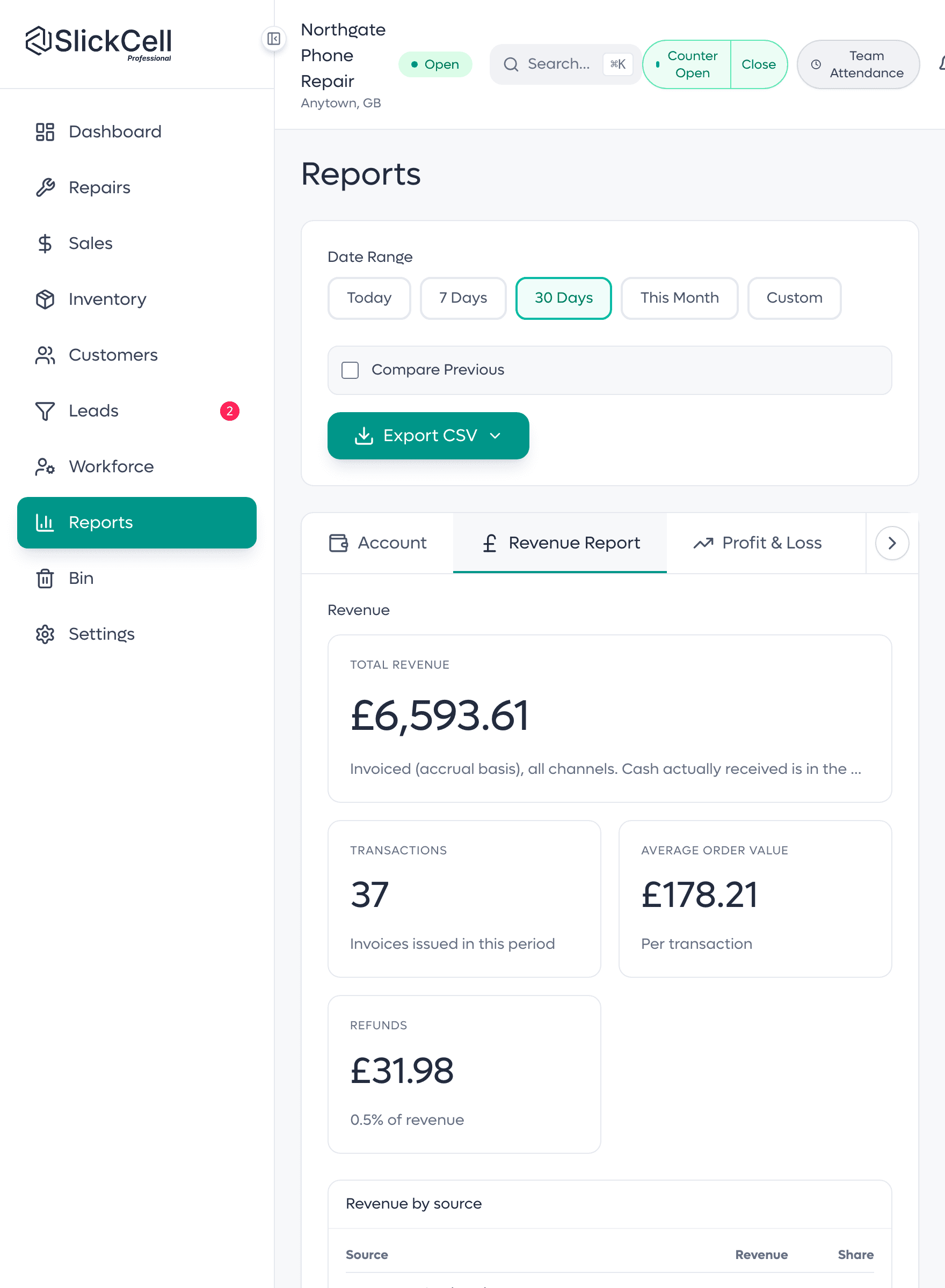
A report total, and its source
The revenue figure and the invoices it is made of, on the same screen: the rows add up to the total exactly. The report is not a separate number; it is the same number, traced.
Fewer disputes, stock that matches, VAT that reconciles
The three things a shop owner actually notices after the first month.
- Fewer disputes
- What was quoted, approved and paid is on the ticket, so collection stops being an argument.
- Stock that matches
- Quantity is derived from real units, so the shelf and the system stop drifting apart.
- VAT that reconciles
- Standard and margin-scheme VAT are reported separately, from the same records as the invoices.
- Deposits that count
- Money taken at intake is money against the bill rather than something to remember.
- A month you can close
- Figures open onto the records behind them, so month-end is checking rather than rebuilding.
Mobile phone repair software: what you get
Repairs
One ticket per job, from booked in to handed over, with warranty from handover.
A repair-aware till
Repairs, accessories and handsets on one sale, with split tender.
Device-unit stock
Each handset its own record; parts counted by quantity.
Invoices & payments
Part payments, corrections and refunds as one financial history.
Used devices
Cost, margin and margin-scheme VAT held per unit.
Trade-ins
Take a handset in, cost it, and put it on the shelf as stock.
Reports & tax
Figures that open onto the records that produced them. An AI summary of your reports in plain English.
More than one branch
One login across shops, with stock and staff kept per branch.
Mobile scanning
Pair a staff phone off a QR and scan into the open sale.
Customer updates
Email from the job, and a QR code on every receipt that opens a live repair status page.
Cash drawer
Open on a float, close on a count, see the difference.
Stocktake
Count against a snapshot; stock moves only once approved.
What shop owners ask before switching
The questions shops ask before they switch, answered straight.
Yes. Phones, tablets, laptops, desktops and all-in-ones, games consoles, smartwatches, earbuds and headphones are device types in their own right, each with its own brand list. The intake checklist changes with the type, so a laptop is checked for its hinge and keyboard and a console for its controllers. Every device is booked in by its IMEI or serial number.
The plans start at a single location with three app users, which is the size most shops begin at. The parts you do not need stay out of the way. You are not paying for a multi-branch rollout to book in a screen repair.
Yes. Parts, accessories and devices import from CSV with a preview of exactly what will be written before anything is saved. Most shops finish open repairs on the old system and start new work in SlickCell from go-live.
It becomes one record instead of a board, a notebook and a phone thread. The job and the money live on the same ticket, so a deposit taken at intake is money against the bill rather than something someone has to remember at collection.
Devices, yes: each carries an IMEI, serial number or shop reference stored as free text. Parts and accessories are counted by quantity, which is the right shape for a box of screen protectors. You are not logging cables one at a time.
Yes. Tax is a rule you configure, and margin is one of the rule types, scoped to used stock. Each device carries its own purchase cost, so the margin on every sale is worked out from that unit, and margin-taxed sales are reported separately from standard-rated ones.
The shortfall stays visible as a balance against the job. It is never converted into a discount, so you can see what is owed, chase it, and settle it later against the same record rather than opening a new one.
Yes, from one login, on the Professional plan and above. Each branch keeps its own stock and its own staff, the owner adds branches from the main shop, and every branch can be read together on one dashboard and in the reports. Each extra branch is £39 a month, excluding VAT.
Starter is £39 a month, Professional £59 and Supplier Pro £99, all excluding VAT, or ten times the monthly price for a year. Every feature is on every plan; plans differ by team size, locations, discount rules and support. Every plan starts with a fourteen-day free trial with no card.
See the whole-shop workflow
Bring us your Tuesday (the part-paid repair, the trade-in, the job that had extra work agreed halfway through) and we will run it end to end.