





4 August 2026
VAT margin scheme for used devices: how it works
A plain-English guide to margin VAT on second-hand devices, and how to avoid over-declaring.
Read full blog: VAT margin scheme for used devices: how it worksSlickCell is repair shop software for electronics repair and retail shops: phones, tablets, laptops, games consoles and smartwatches. Book repairs, sell at the till, track every device by IMEI or serial number, order from suppliers and keep staff rotas, all in one web app hosted in London.
14 days free. No card needed.

None of these are the shop's fault. They are what happens when the till, the repair notebook and the stock sheet do not talk to each other.
A paid repair is edited later, and the bill no longer matches what was taken.
A customer underpays and the difference quietly disappears.
A device is sold without the right IMEI or serial number against it.
A part is used on a job but stock is never reduced.
The invoice and the report show different totals for the same week.
A supplier delivery does not match the order, and nobody catches it.
The job, the sale and the stock, kept in one system instead of three. Press play for the short version.
The film plays here from YouTube, and nothing is loaded from YouTube until you press play. Watch it on YouTube
The same job from the counter to the ledger. Each step writes to the next, so nothing has to be re-entered and nothing changes silently.
Because those steps are joined, a part used reduces stock, the stock movement lands in cost of goods, and cost of goods lands in the profit and loss, and none of it can be changed silently.
Built for the way repair shops and electronics traders actually work
Built for shops that repair and sell electronics, where every device has its own IMEI or serial number and its own cost.
Raise a purchase order, receive stock against it in full or in part, and keep supplier bills and returns with the order that created them.
Every device is its own record: specs, cost, condition and history tracked per unit.
Second-hand margin VAT handled correctly, so your returns add up first time.
Run several shops from one login, see every branch in one report, and settle trade-ins as store credit.
Repairs, point of sale, stock, invoices, suppliers, staff and reports share one set of records. Pick the part of the day you want to see.
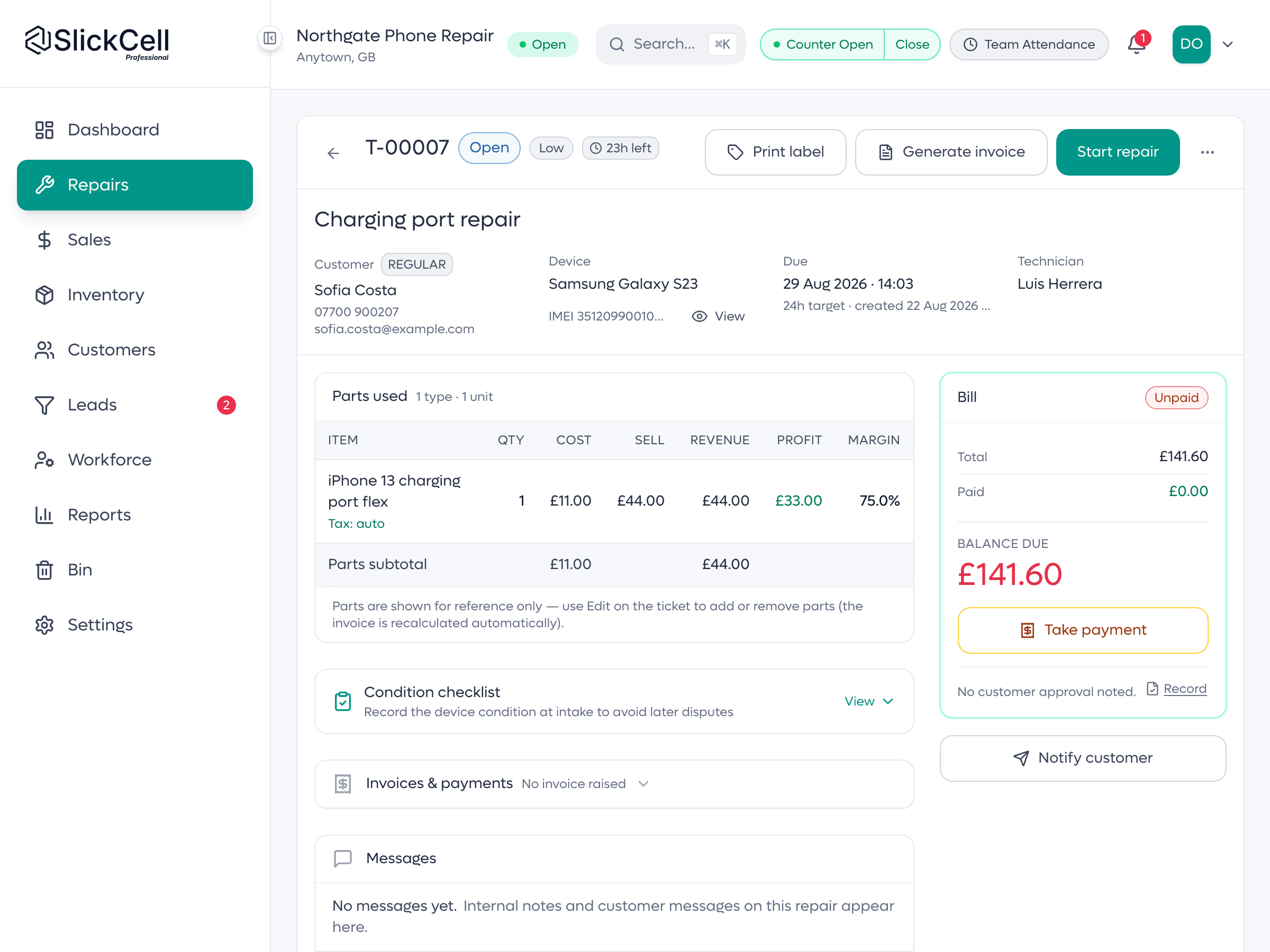
One ticket carries the device, the fault, the deposit, the parts committed to it and the handover. The money moves with the job because they are the same record.
Booked in → handed over, with the money correct at every step.
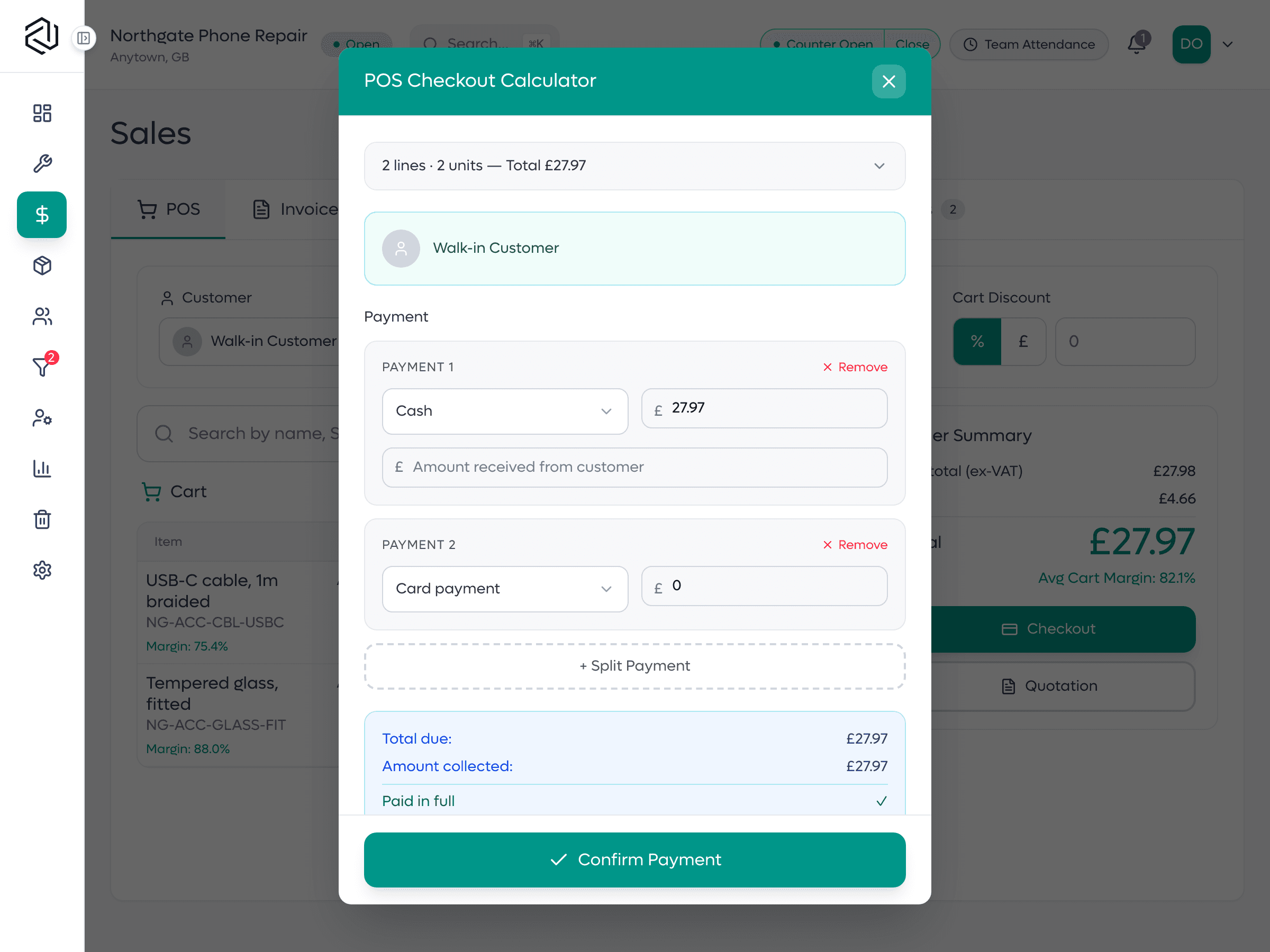
Ring up a repair, an accessory by quantity and a device by its IMEI or serial number on the same sale, then settle it across more than one method.
Split payments across cash, card, bank transfer and store credit.
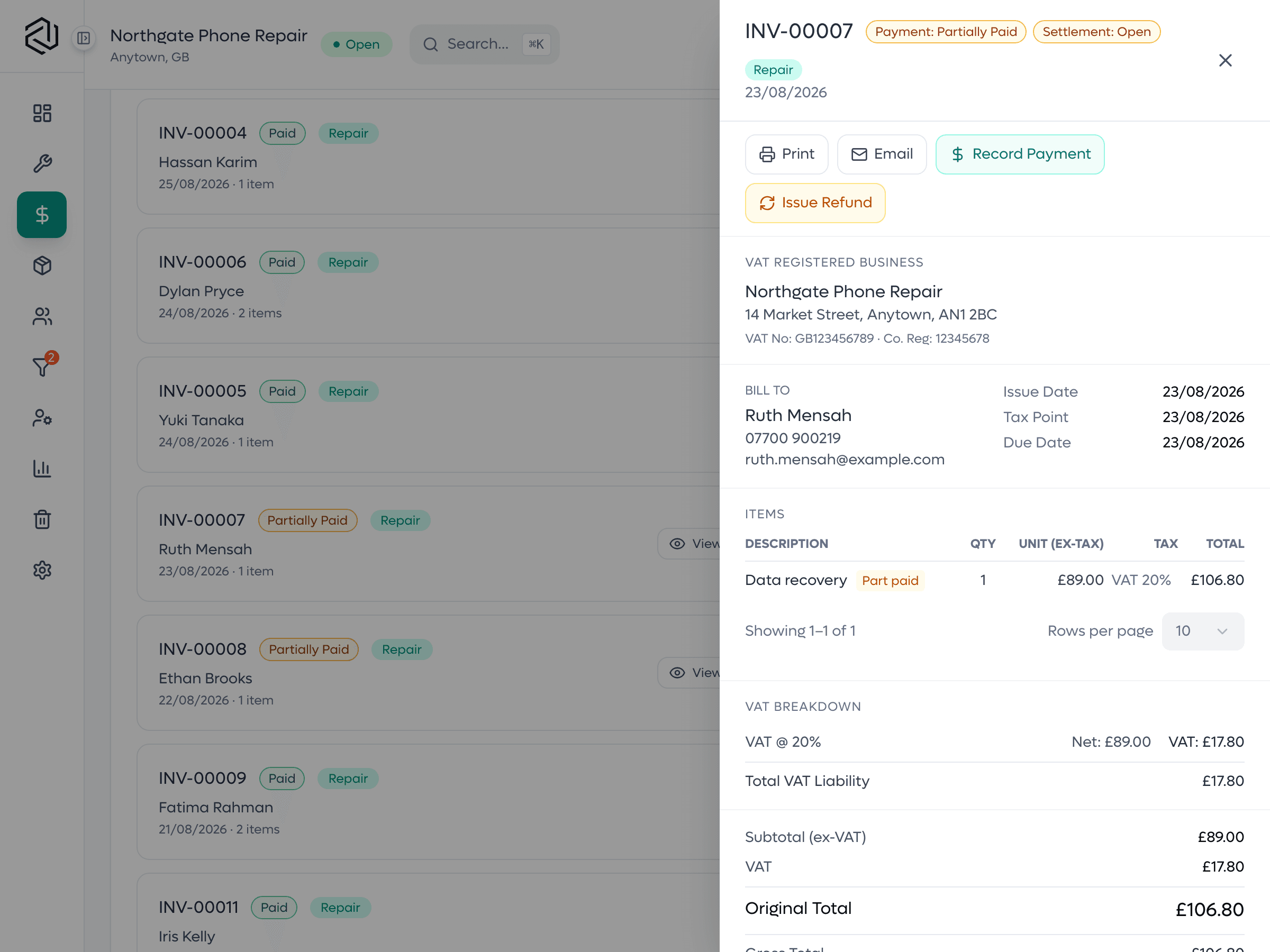
Each payment is recorded against the invoice it settles, so the balance is derived rather than typed, and a refund never quietly reopens a bill that was paid.
The balance is what the payments say it is, not a field someone edits.
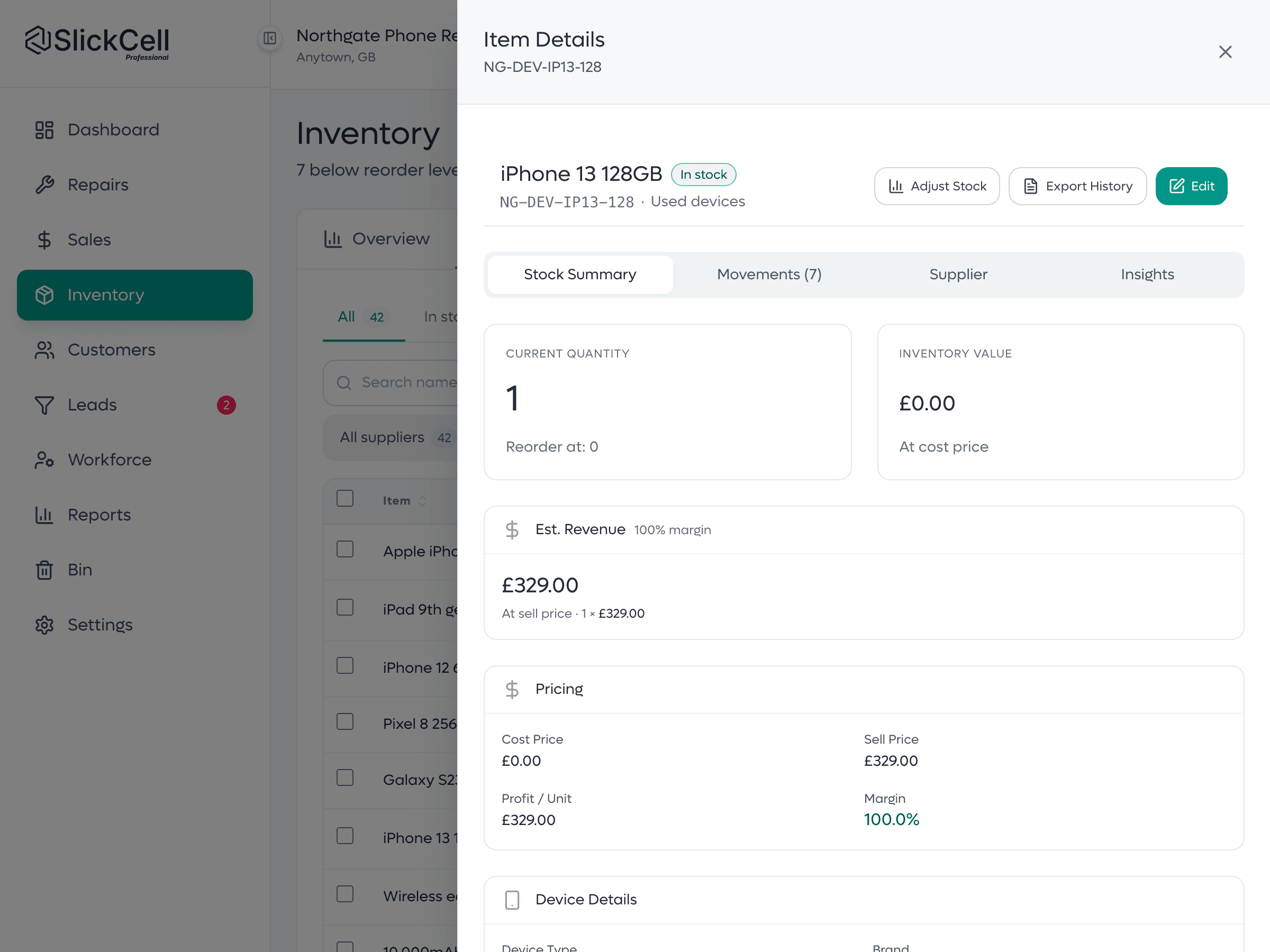
A device is its own row with its own IMEI or serial number, condition, cost and price. Quantity is counted from the units on the shelf rather than typed into a box.
Two identical devices are two records, because they cost different amounts.
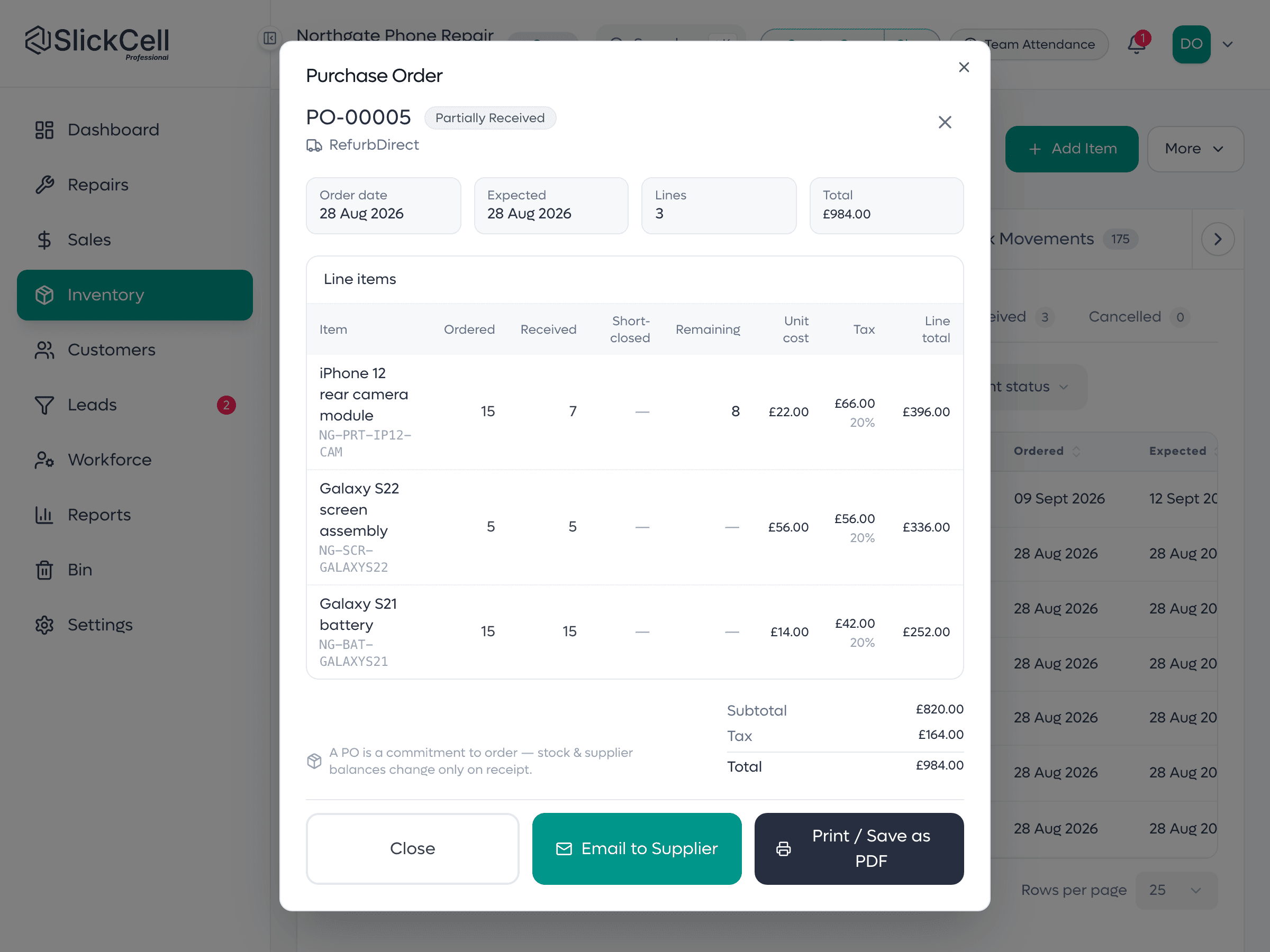
Receive against the order you raised. A short delivery is visible at the moment it is booked in, not when the bill arrives three weeks later.
Ordered, received and billed are three separate numbers you can compare.
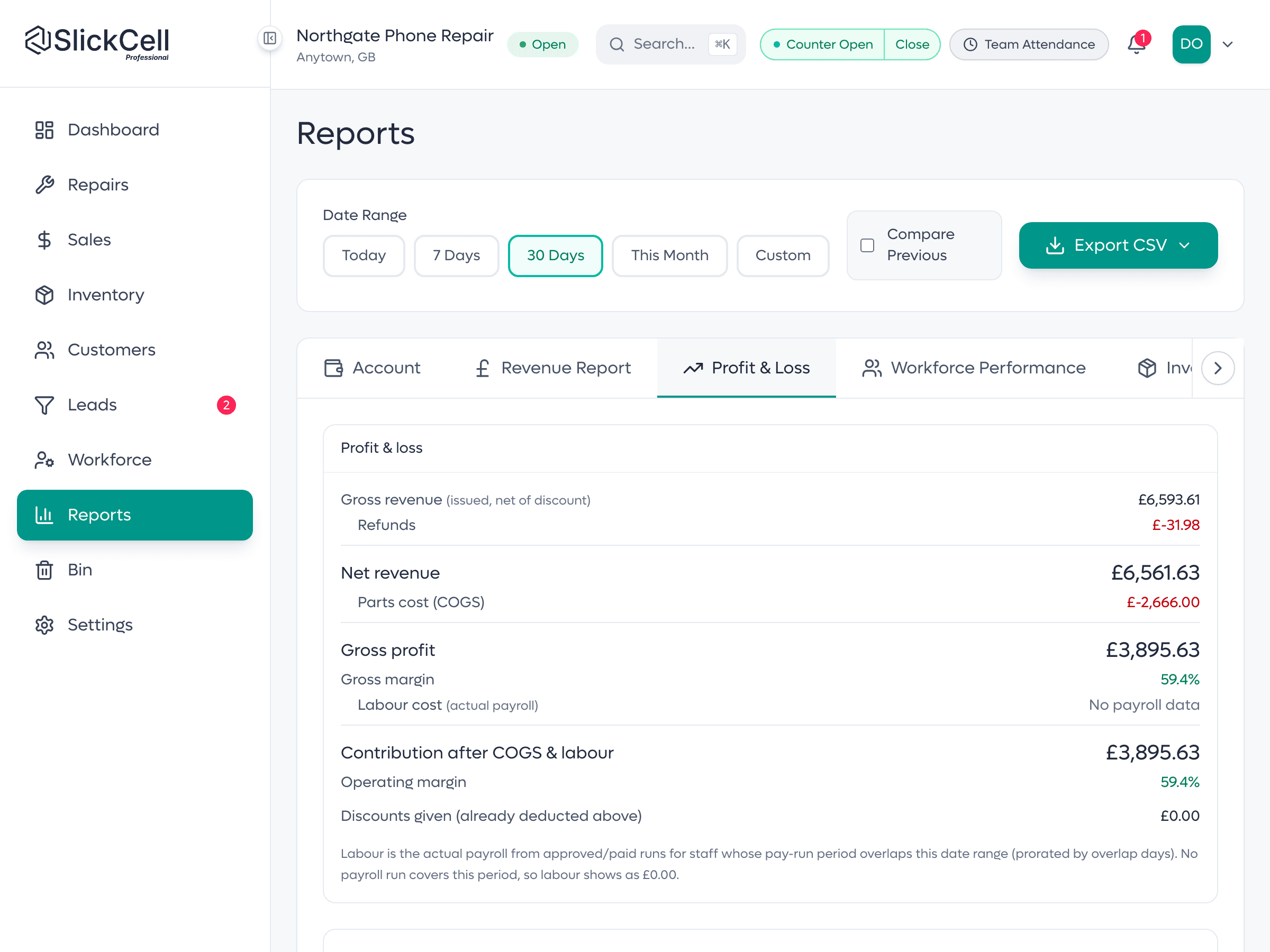
Revenue, profit and tax read from the same ledger the till writes to, and every figure can be opened to see the invoices underneath it. Slick Intelligence reads your dashboard and reports back in plain English, next to the figures it is drawn from: what changed, what improved and what needs your attention. It is included on the Professional and Supplier Pro plans.
Margin-scheme tax is reported separately from standard-rate tax.
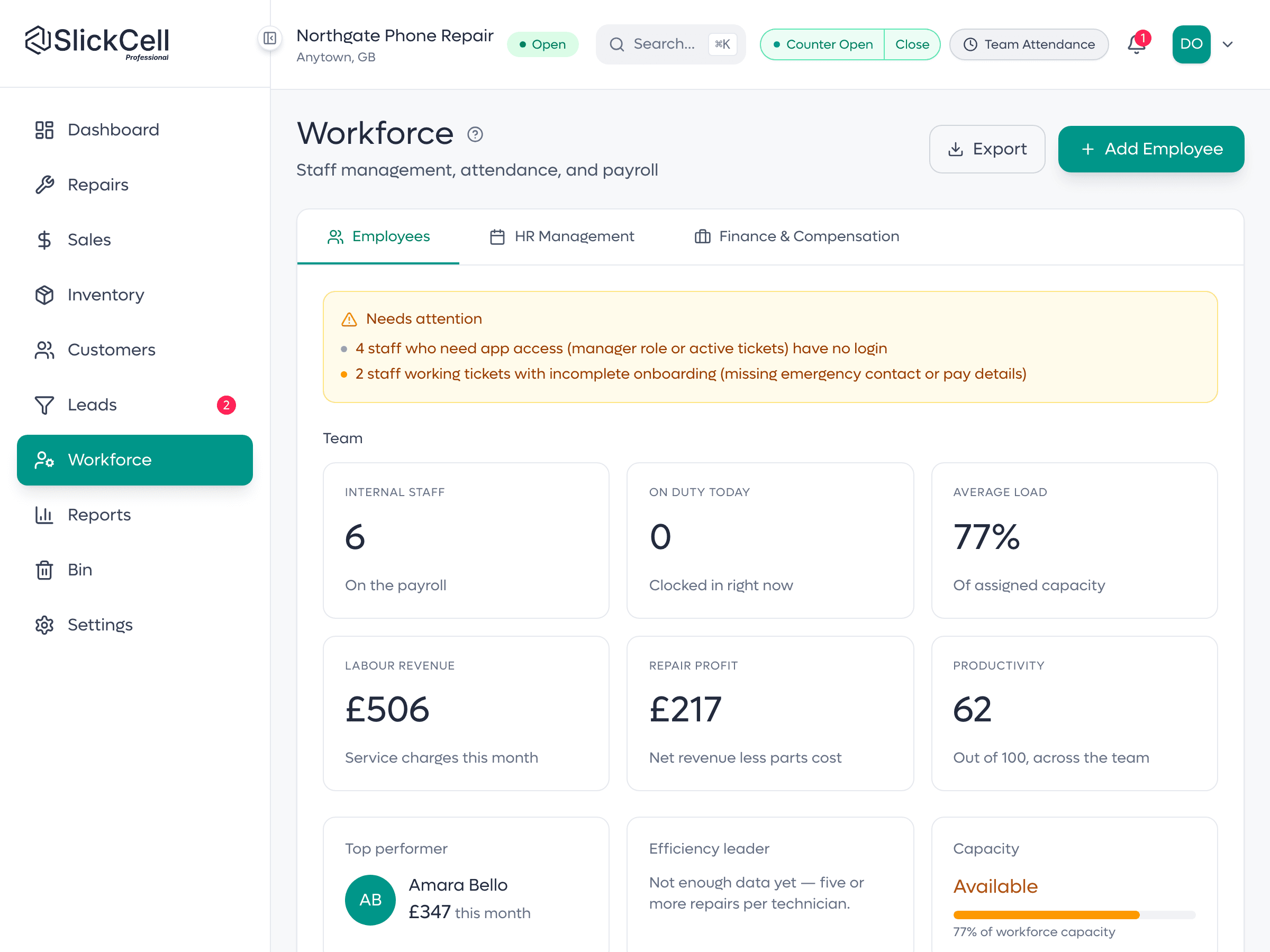
Roles decide who can discount, void, refund or see cost prices. Shifts, attendance and leave are recorded against each employee, and payroll prices the hours at the rate in force on each day.
Refunds, voids and price edits are role-gated on the server, not just hidden.
Your purchase order arrives as their incoming order: not an email they retype. They confirm or re-quote, you approve line by line, and stock is reserved until the dispatch is confirmed.
Approving reserves the stock. Confirming the dispatch is what moves it.
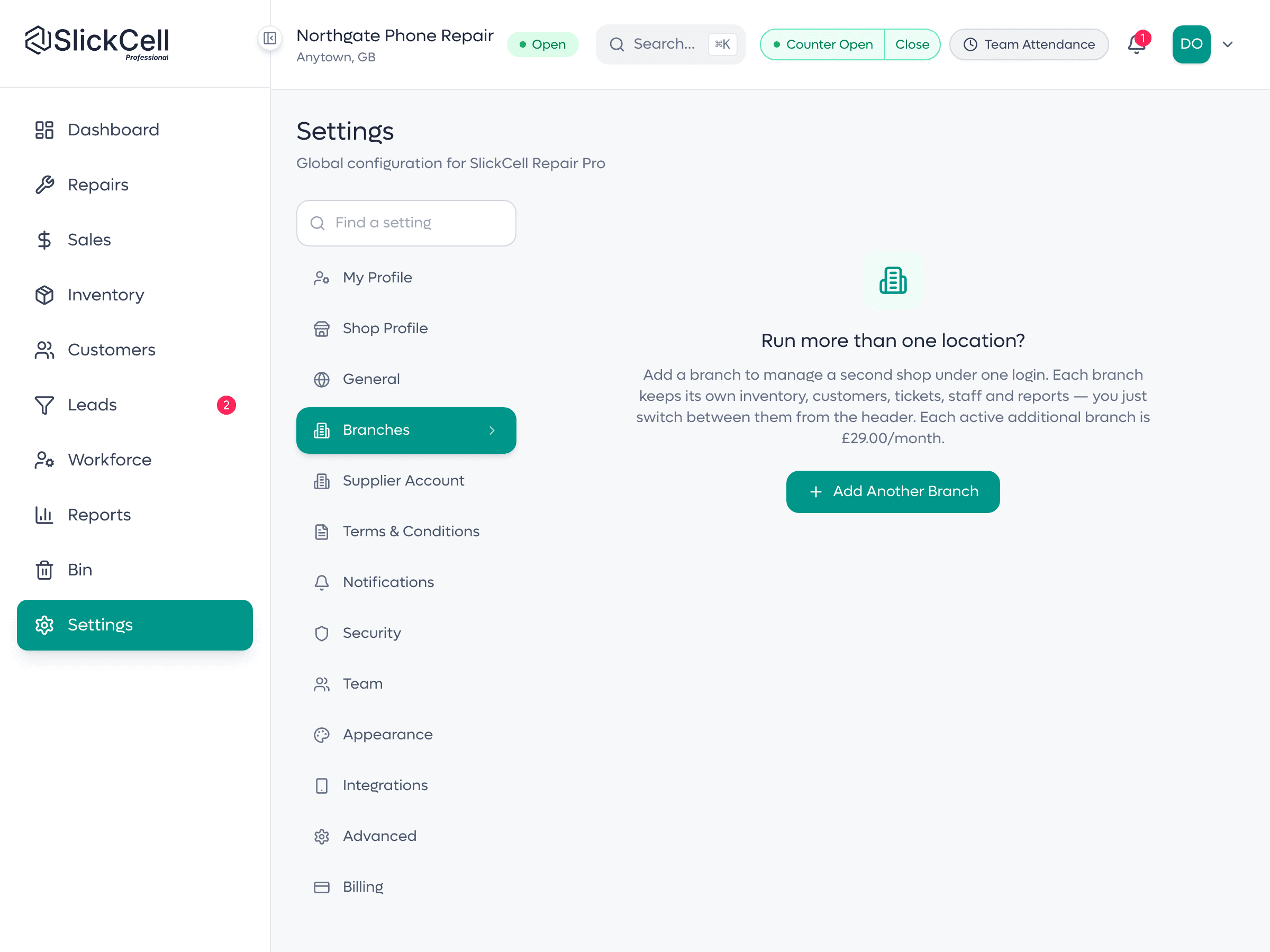
Each branch keeps its own stock, staff and takings. The group view reads across them without merging anything.
Stock stays branch-owned; the group view is a read, not a merge.
The two things worth seeing move rather than read about: a sale being rung up, and a phone standing in for a barcode scanner.
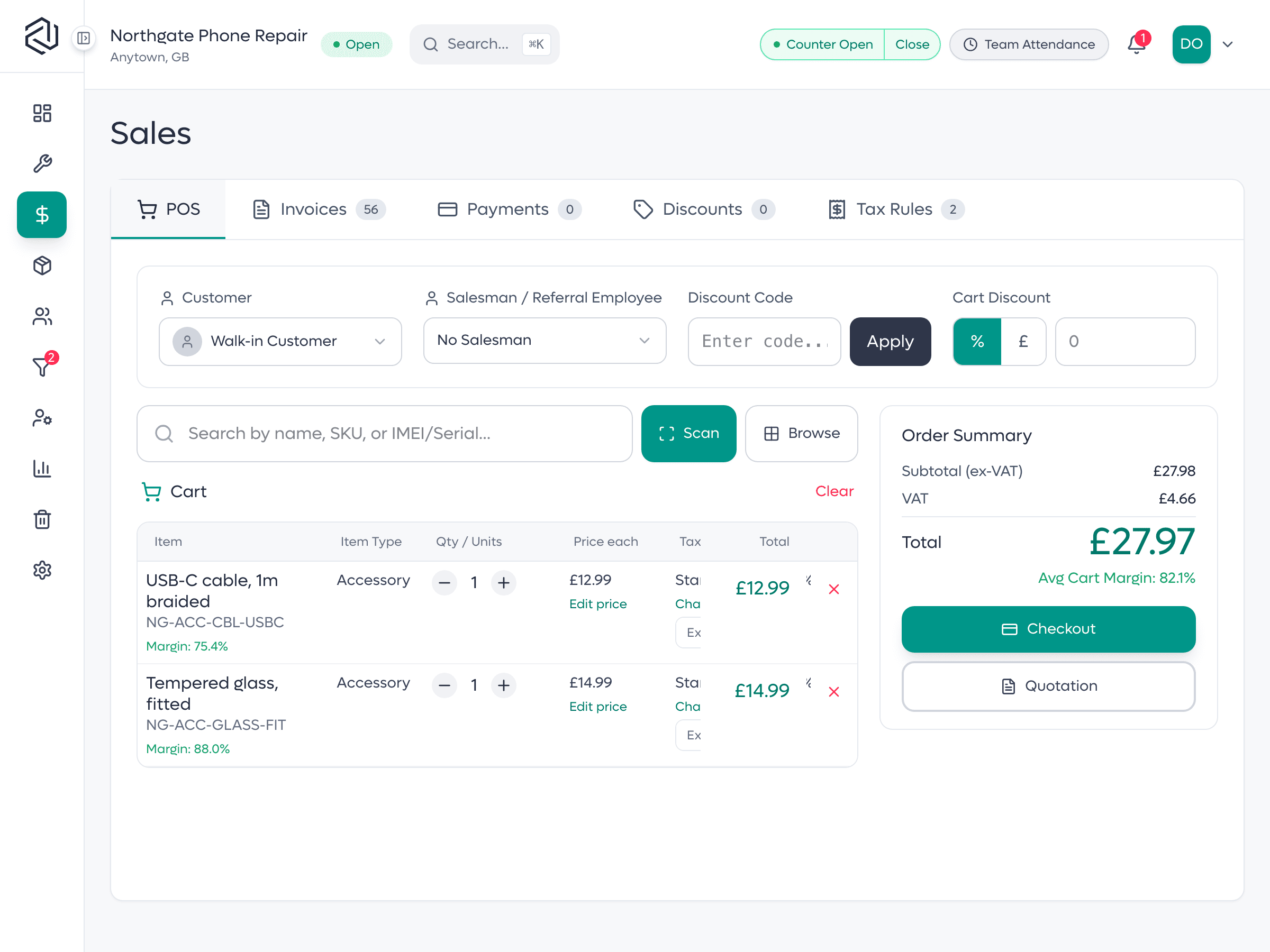
Ring up repairs, accessories and second-hand devices, take split payments across card and cash, and print or text a receipt in seconds.
Split payments across cash, card, bank transfer and store credit.
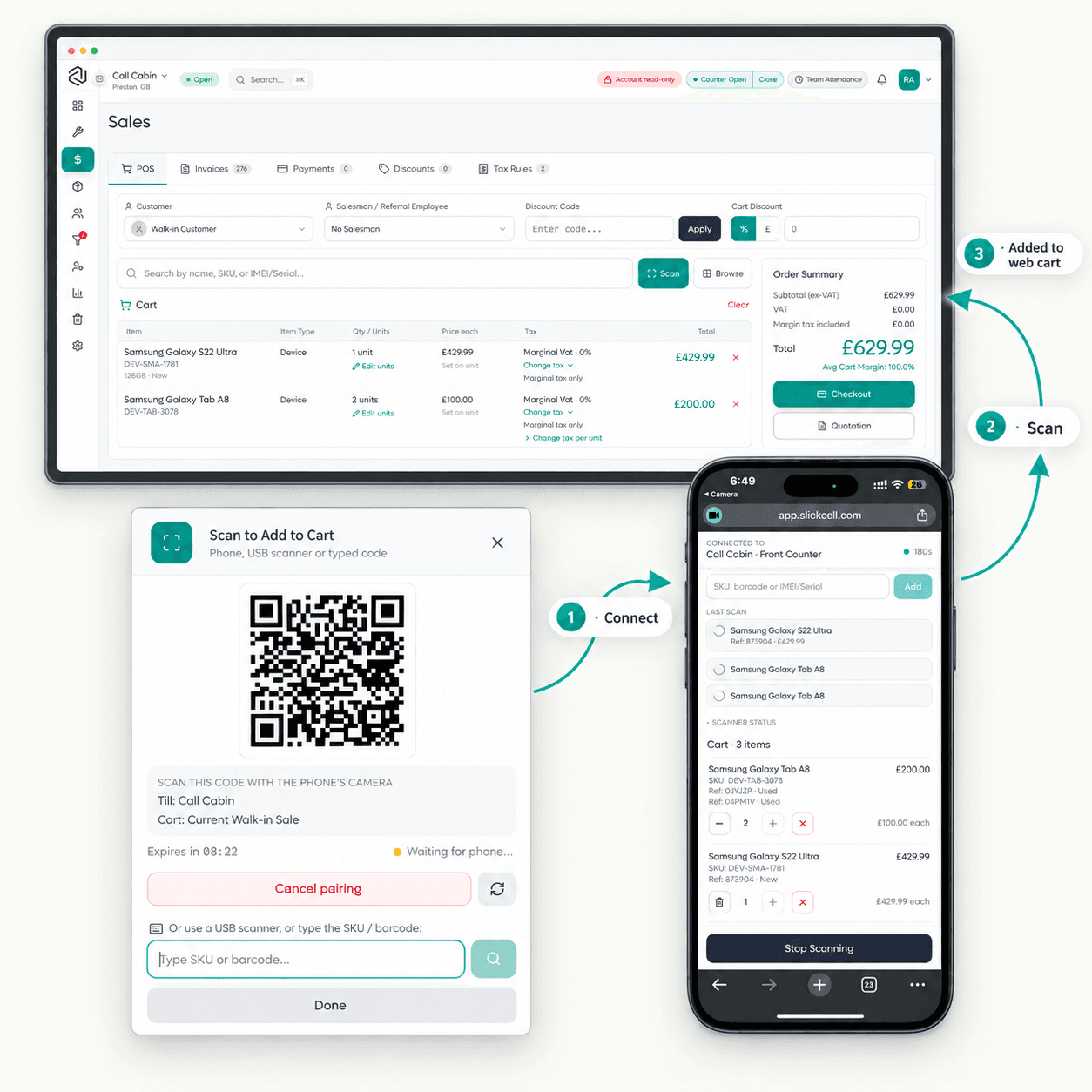
Show the QR on the till, scan it with a staff phone, and start scanning stock straight into the open sale. No scanner hardware, no app to install, and no login on the phone.
No cost, no margin, no customer details, and it cannot change a price or take payment.
Your repair business already has the answers. Slick Intelligence brings them forward, turning the data already flowing through SlickCell into clear signals about performance, operations and what needs your attention.
Understand performance
See the changes that matter in revenue, margins, profit, refunds and sales on the dashboard and on the Revenue, Profit & Loss, Tax & Refund and Counter reports, without digging through each one. Included on the Professional and Supplier Pro plans.
Spot what needs attention
Overdue repairs, completed repairs with no invoice, unpaid balances, till differences and low stock are listed under Needs attention, each with a link to its list. Included on the Professional and Supplier Pro plans.
Work faster
Slick Match lines your spreadsheet's columns up with SlickCell's fields, and Slick Intelligence Import points out a possible existing item or a similar supplier name. On every plan.
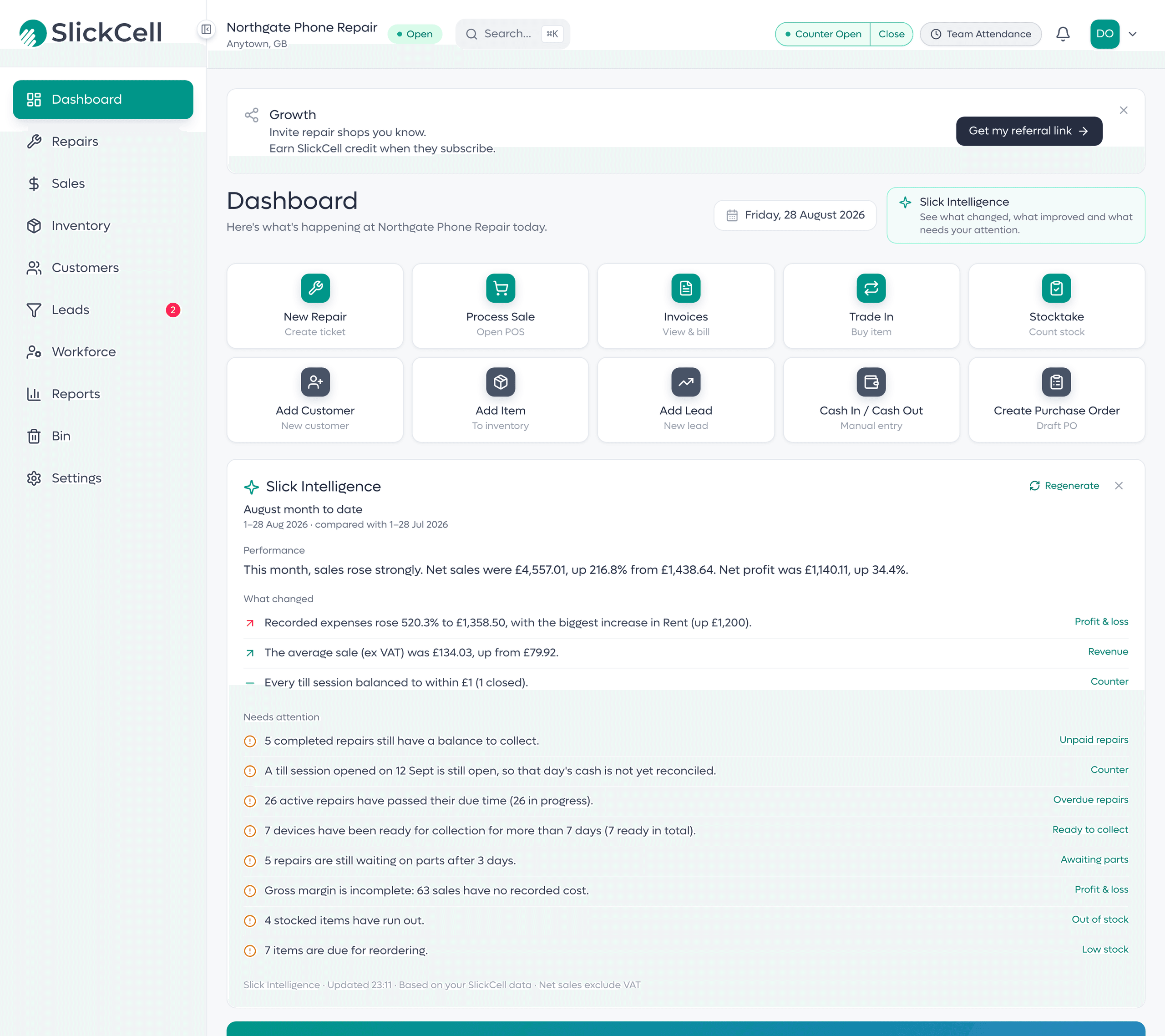
You decide
An uncertain match waits for your choice, and the import preview writes nothing.
Your role, your view
A technician's summary covers repairs, never money. Till findings are for owners and managers.
Your own figures
Every figure in a summary is taken from, or worked out from, your SlickCell reports.
Three things you can inspect. If the documents are right, the system underneath is right.
Two payment lines on one checkout, with the total due and the amount collected side by side. The screen says paid in full only when the two meet: the case where money usually goes missing.
One device as its own record: how many are on the shelf, its cost and sell price, the margin between them, and a movements tab for how it got there. Quantity is derived from units, never typed.
Gross revenue, refunds, parts cost and gross profit on one screen, each line the one above it less the one between. The total is not a separate number; it is the same lines, added up in front of you.
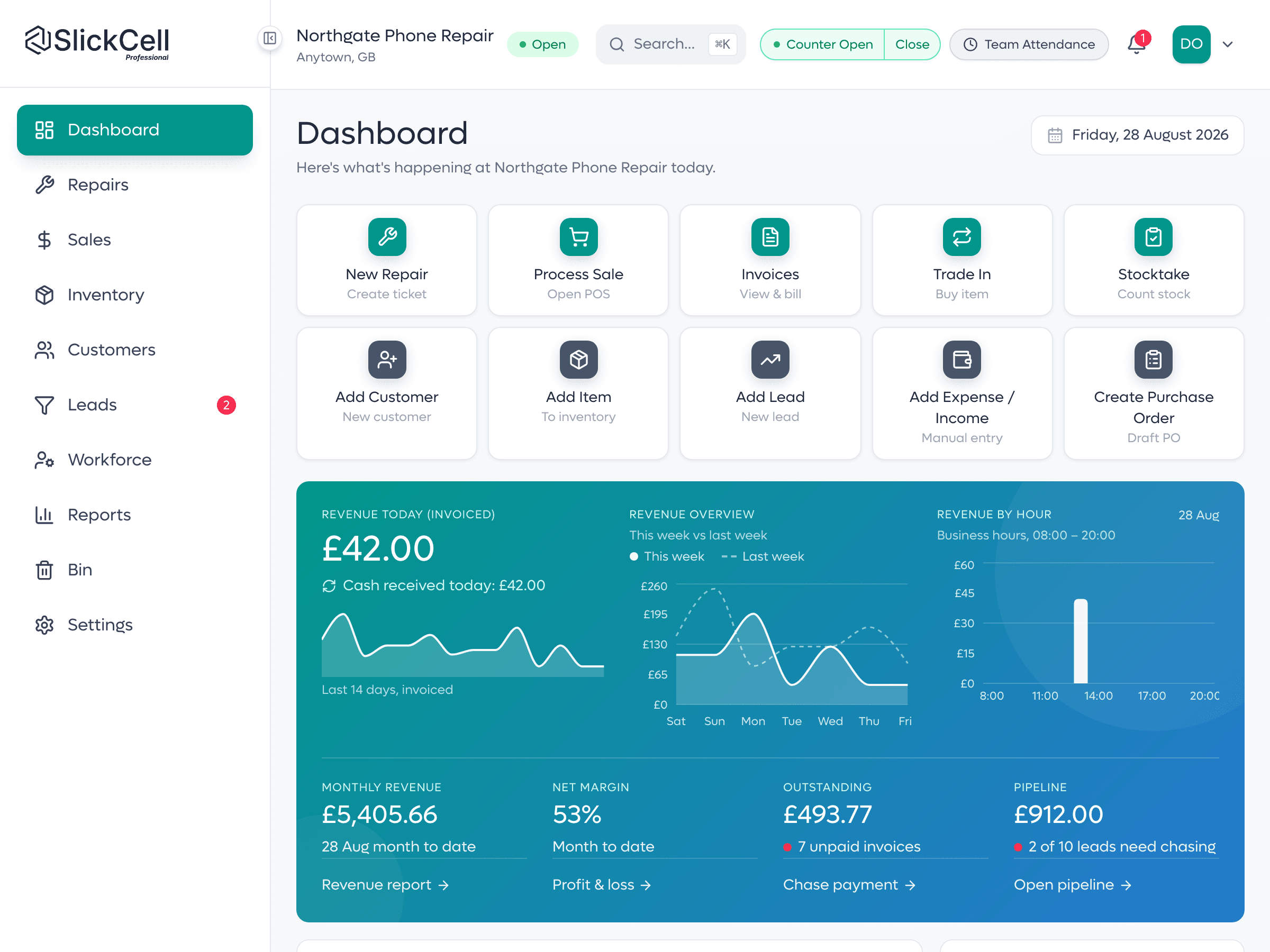
Today at a glance
Takings, open repairs and jobs due out: the moment you open up.
Numbers you can trust
Every figure traces back to the record it came from: no second spreadsheet.
Jump to any screen
⌘K opens a finder for every page, tab and action: no hunting through a sidebar.
Ten one-click jobs
A repair, a sale, a trade-in, a stocktake, and you only see the tiles your role can use.
Every device tracked by IMEI or serial
One device is one record. Quantity is counted from units, never typed.
Margin-scheme VAT built in
Second-hand VAT is computed on the margin and kept off the invoice.
One login across every branch
Each shop keeps its own stock and staff under shared ownership.
Short, numbered guides for the jobs a shop does every day. Each one is written against the app as it is, not as a promise of what it will do.
Create a repair ticket at the counter: customer, device, fault, price, an optional deposit and technician, then print the ticket for the customer.
Read the guidePut accessories, parts and a used device on one sale, take the money across more than one method, and print the receipt.
Read the guidePut a second-hand device on the shelf with its own IMEI or serial number, condition, cost and price, so it is priced as itself rather than as a model.
Read the guideMoving a shop onto new software is the real decision. These are the parts that make it reversible.
Repairs, POS, stock and reports are on every plan: plans differ by team size, locations, discounts, Supplier Operations, Slick Intelligence summaries and support.
Flat monthly pricing, never per device and never per transaction. Every plan includes repair tickets, point of sale, invoicing, stock tracked by IMEI or serial number, purchasing, staff rotas and reports.
£39.00/mo
excludes VAT
One location, everything you need to open up and trade.
14 days free. No card needed.
£59.00/mo
excludes VAT
Multiple locations, discount rules and priority processing.
14 days free. No card needed.
Custom pricing
Tailored to your organisation.
£99.00/mo
excludes VAT
Adds Supplier Operations: sell to other shops from your own catalogue.
14 days free. No card needed.
The quick answers. Can't find yours? Talk to our team.
SlickCell is repair shop software and POS for shops that repair and sell electronics: phones, tablets, laptops, games consoles and smartwatches. It runs repair tickets, the till, invoices, stock tracked by IMEI or serial number, trade-ins, supplier ordering, staff rotas and reports in one web app, hosted in London.
Yes. Phones, tablets, laptops, desktops and all-in-ones, games consoles, smartwatches, earbuds and headphones are device types in their own right, each with its own brand list. The intake checklist changes with the type, so a laptop is checked for its hinge and keyboard and a console for its controllers. Every device is booked in by its IMEI or serial number.
Yes. Every device is its own record with its own IMEI or serial number, cost, condition, selling price and history. A phone is usually tracked by IMEI; a laptop, console, tablet or smartwatch by its serial number. Both are free text, so a partial or unusual reference from older stock is accepted.
Yes, from one login, on the Professional plan and above. Each branch keeps its own stock and its own staff, the owner adds branches from the main shop, and every branch can be read together on one dashboard and in the reports. Each extra branch is £49 a month, excluding VAT.
Yes, with the one you already have. Take the payment on your terminal and the till records it on the sale, split with cash if needed. SlickCell takes no cut of your card takings.
Yes. Parts, accessories and devices import from CSV with a preview of exactly what will be written before anything is saved. Most shops finish open repairs on the old system and start new work in SlickCell from go-live.
Starter is £39 a month, Professional £59 and Supplier Pro £99, all excluding VAT, or ten times the monthly price for a year. Every plan includes repairs, POS, stock and reports; plans differ by team size, locations, discounts, Supplier Operations, Slick Intelligence summaries and support. Every plan starts with a fourteen-day free trial with no card.
Practical reads on running a tidier, more profitable repair shop.
4 August 2026
A plain-English guide to margin VAT on second-hand devices, and how to avoid over-declaring.
Read full blog: VAT margin scheme for used devices: how it works
4 August 2026
Tracking each device as its own unit changes what you can see, sell and trust on the shelf.
Read full blog: Why stock by IMEI or serial beats a quantity count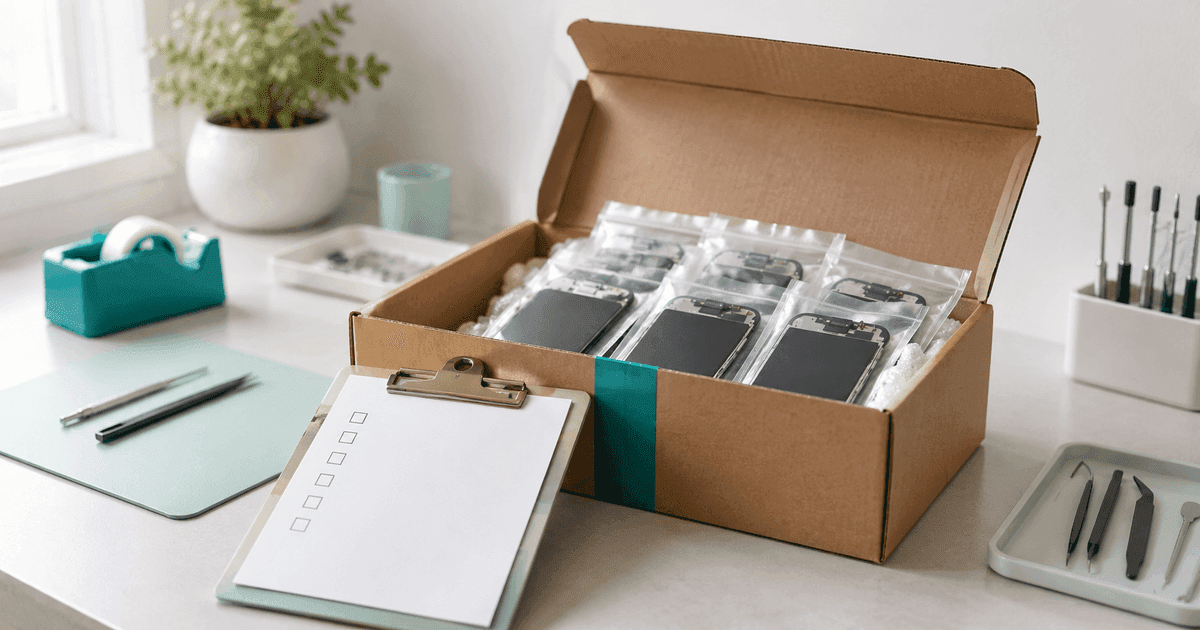
4 August 2026
Why booking stock in against the order you raised is what stops a short delivery quietly becoming your problem.
Read full blog: Purchase orders, receiving, and the gap in betweenStart a 14-day trial on any plan, or see it on your own counter first.